
How to Measure Content Quality: An Effective 5-Factor Framework
Great content does more than answer a reader's questions. It also gives them context to trust the answers and direction to act on what they learn.
This guide introduces a logic-based 5-factor framework for assessing content quality so you can improve the page where it matters most. It helps you see whether a page earns trust and gives readers enough value to stay engaged.
Here’s what you’ll get:
- The 5 factors that drive content quality
- A 0–15 point scoring system to assess pages quickly
- Practical checklists for each factor
- Advice on how to prioritize improvements
- A rough timeline for seeing results
This framework sits between our guide on how to do a content audit and our guide to building a content refresh strategy. Use a content audit to prioritize pages across your site. Use the refresh strategy guide to diagnose what the page lost and decide how much intervention it needs. Then use this framework to assess the quality of each priority page in more detail.
You can also download the Content Quality Assessment Checklist below to apply the same framework in a practical, repeatable way.

How To Use This Guide
Start with the quick-start breakdown for the fast version. Use How To Score A Page and What Your Score Means when you are assessing a specific page. Use the five factor sections when you already know a page is weak and need to diagnose what to fix first.
Disclaimer: We'll explore AI optimization in this article, but it's far too new to claim expertise or mastery. So, that's not the framing or positioning here.
We simply wish to share a content framework that works for our clients and may be helpful for you. It uses tried and true content marketing fundamentals and adapts and integrates new AI tactics from trusted industry sources working at the forefront of AI search.
And since this field is evolving rapidly, we'll continue testing and refining our approach with curiosity and an open mind.
What Determines Content Quality?
Content quality is subjective, but a good page should satisfy the right reader’s needs with clear, trustworthy information.
This framework is for marketers, SEO teams, founders, and content leads responsible for deciding whether a page deserves more investment and what level of intervention it needs. Score each page across five factors for a total out of 15, then use the final score to choose the right action.
Strong content usually does five things well:
- It matches intent. We call this contextual understanding to determine whether the page answers the main query quickly and covers the follow-up questions a reader is likely to ask next.
- It earns trust. This is credibility and freshness: the content earns trust through current evidence and clear authorship.
- It is easy to use, also known as a great user experience: the page structure helps readers stay engaged and find answers without working too hard.
- It adds something original. This is uniqueness and value-add: the page includes experience, examples, data, opinions, or frameworks that competitors cannot easily copy, giving readers something genuinely useful.
- It gives the reader direction. We refer to this as guidance: the content makes a useful next step clear when the reader actually needs one.
Use the framework below to score one priority page, find the weakest factor, and decide what to fix first.
The 5-Factor Scorecard
| Factor | What It Measures | Key Actions | Quick Win |
|---|---|---|---|
| Contextual Understanding | Does your content address your specific target user's primary query plus their likely follow-up questions? | Create mind maps of related topics. Use Google Suggest, Reddit, PAA, and forums to find the follow-up questions people actually ask. Try to cover beginner to expert contexts. | Add at least 3 follow-up questions users ask after reading your main topic |
| Credibility & Freshness | Is your content trustworthy, current, well-sourced, and machine-readable? | Use data from the last 12 months. Add 3–5 authoritative sources. Include author credentials, and use structured data where it helps search engines understand the page. | Update your oldest statistics with current data - prioritize updating offer pages first. |
| User Experience | How easy is it for all users (human and AI) to find, understand, and parse your content? | Write in 100–300 word semantic chunks. Use conversational headings. Add visual support where it clarifies the point, choosing the format that makes the information easiest to understand. | Turn headings into questions, and follow with bolded TL;DR-style answers. |
| Uniqueness & Value-Add | Does your content offer distinct value and demonstrate expertise not found in existing content in ways that AI cannot easily replicate? | Include original data, first-hand experience, and tested frameworks. Share specific results and conditional advice. | Add "In our testing..." example with specific numbers whenever possible. |
| Guidance | Does your content guide users toward a relevant next step, decision, or deeper learning outcome? | Match CTAs to user journey stage. Address common objections. Provide decision-making frameworks (comparisons, etc.). | Add journey-matched CTA based on user awareness stage, and add internal links to relevant content in the next stage. |
How to Score a Page
Use this framework to assess one page at a time. The score measures the quality of what’s on the page while performance metrics show what happens after people find and use it:
- Choose a page that matters to your business or is underperforming in search.
- Score each of the five factors from 0 to 3 for a total out of 15.
- Use the final score to decide how much intervention the page needs, from rebuilding weak content to extending the reach of strong content.
For the fastest wins, start with pages that already show traction but have one clear weakness holding them back.
If the page is worth saving but the right fix is unclear, use our content refresh strategy guide to diagnose what changed before choosing the intervention.
What Your Score Means
| Score | Action label | What it means | Next step |
|---|---|---|---|
| 0–5 | Remove / Full Redo | The page has major quality, intent, or business-value issues. | Rebuild the page when its purpose still matters; otherwise, remove it or redirect to a more useful page. |
| 6–7 | Heavy Revision | The page has a useful foundation, but several factors are weak. | Rewrite the weakest parts deeply enough to fix the page’s underlying quality problems. |
| 8–11 | Update | The page is worth keeping, but it needs targeted improvements. | Fix the weakest 1–2 factors first. |
| 12–13 | Promote | The page is strong enough to invest in reach rather than another rewrite. | Improve reach rather than rewriting the whole page. |
| 14–15 | Repurpose | The page is one of your strongest assets. | Repurpose the page into formats that extend its strongest ideas to audiences who will not find the original. |
Get Your Content Quality Assessment Checklist
Map The Main Query And Follow-Ups (Contextual Understanding)
Search has shifted from target keyword matching to understanding complete user intent. Your content must address your audience's primary question AND the logical follow-up questions they'll explore next. That's because of the query fan-out technique.
What Query Fan-Out Means For Your Content
AI search uses query fan-out techniques which immediately generate dozens of related 'subtopic' searches from a single query.
These systems expand the query landscape by using context to infer what a searcher is likely to need next.
Key Takeaway: Your content must address the primary query AND logical follow-up questions specific target users will likely want to explore next.
Map Follow-Up Questions
To make your content more useful for both readers and AI-assisted search, map the user journey and anticipate the follow-up questions people are likely to ask next. This means thinking beyond the single query to address the logical next steps users will want to take throughout their entire decision-making process. Proactively addressing these relevant content connections ensures complete coverage.
For example, someone assessing content quality will likely also want to know which pages matter most before deciding where to invest their time and resources.
Practical Tip: Map out 5-7 related questions users may ask after consuming your main topic. Use tools that uncover real follow-up questions like AlsoAsked, then prioritize paths people engage with (like on subreddits and facebook groups) rather than collecting every possible branch.
Account For Audience Behaviour
Search systems can use behavioural signals to shape results when context suggests that different readers need different answers such as beginner versus expert, mobile versus desktop, or research versus decision-stage needs.
Action Item: Focus your content on what your target users actually need.
- Ask yourself: "Would your ideal customer find this useful enough to return to when the same problem comes up?"
- Our job as content creators is to encourage these positive user behaviours that signal value to both users and AI systems. This focus helps you decide how much depth a reader needs and which format will make the answer easiest to use.
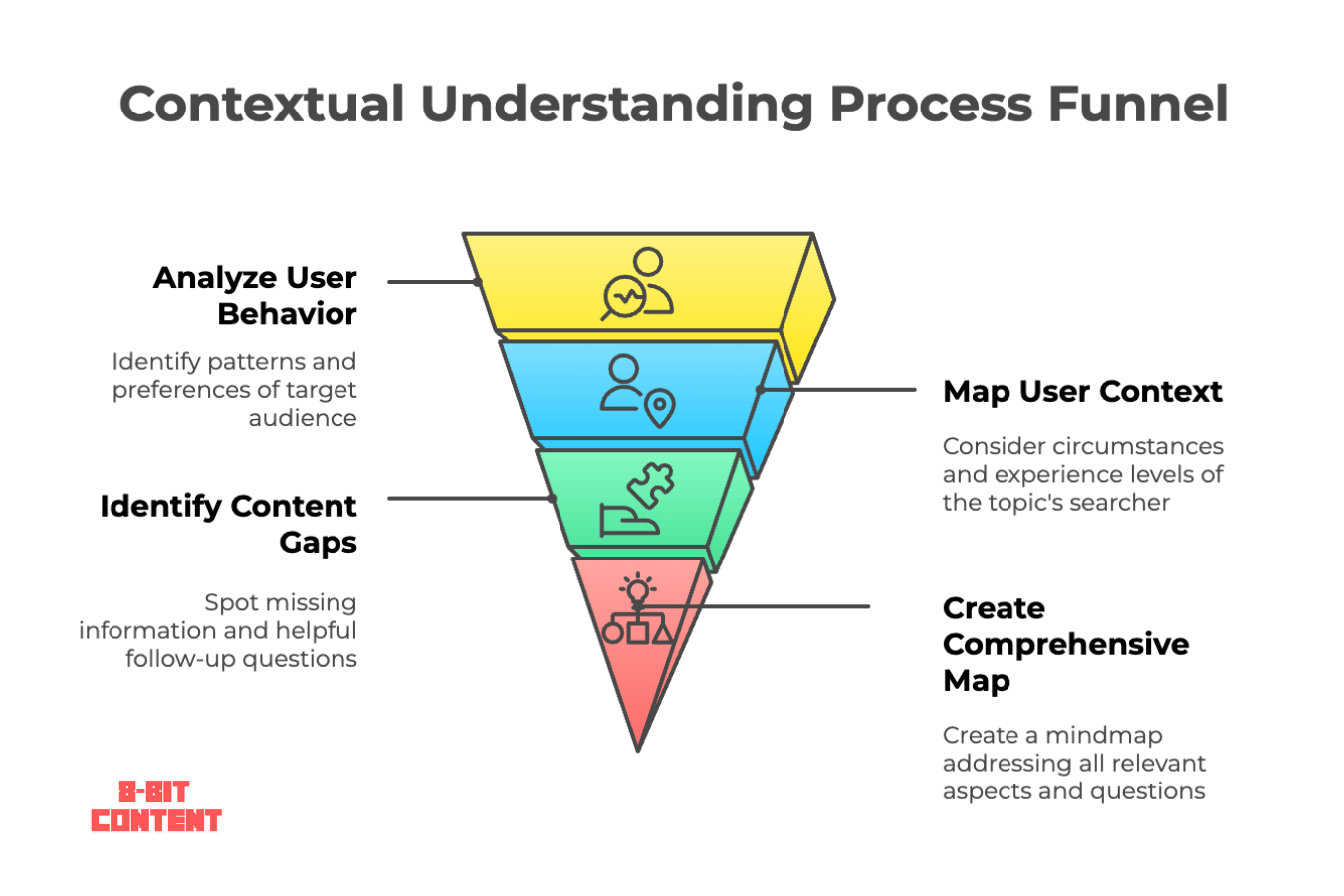
Scoring: "Does your content address the user's primary question plus their likely follow-up questions?"
Quick assessment checklist:
□ Intent mismatch - Your content doesn't address the core user problem or skips follow-up angles users will want to explore
□ Buried answers - Main answer not in first 1-2 paragraphs, missing or unclear TL;DR
□ Incomplete coverage - Doesn't address related FAQs, PAA terms, or relevant keyword variants that users expect
□ Shallow depth - Less comprehensive than top competitors on the SERP, missing key subtopics
□ Missing context variations - No consideration of user circumstances, experience levels, or consumption contexts (mobile vs desktop, beginner vs expert)
□ Weak content relationships - No explanation of how the topic relates to broader concepts, prerequisites, or next-step implications
Scoring: 0 issues = 3 points | 1-2 issues = 2 points | 3-4 issues = 1 point | 5-6 issues = 0 points
(Please make note of the Scoring Guide above!)
Helpful Tools To Assess Contextual Understanding
- Google Search Console (GSC) (Free): Lets you see which queries already earn visibility and compare impressions, clicks, and positions before deciding where coverage needs work. The goal is to have at least 15+ relevant queries per page (with high impressions and in high positions).
- AlsoAsked (Freemium): A valuable tool that shows you likely follow-up questions users ask. And because it uses a mind map style design (although they all do, since AnswerThePublic), it's great for spotting missing coverage areas and understanding the full search query landscape.
- Frase (Paid): An NLP content optimization tool that surfaces PAA questions and scrapes real questions from Reddit and Quora, giving you one place to spot missing follow-up coverage. This way you can get a full view of the subtopics your target audience may want to know as you create.
- Quick test: Ask your preferred large language model what follow-up questions a reader may have after your content. The gaps they identify show where your coverage needs work. We've been also been experimenting with the follow up questions provided by Perplexity as a source.
- Content gap analysis: Search your main topics on conversational AI platforms. Note what information appears that you haven't covered. This reveals content opportunities your traditional keyword research might miss. But we'll get into this more a in the 'Which Criteria Will Deliver the Fastest Results?' section below. With a full video walkthrough on how to set up your own free analysis thanks to a senior SEO at TripAdvisor.
How To Apply Contextual Understanding
- Before creating: Define your target audience's core query and analyze 3-5 competing content pieces for gaps. Seek out at least 5-7 highly relevant subtopic ideas your user will likely also want to know.
- During creation: Write clear, engaging, and conversational titles that match the style user may search. Place critical information under each header. And be sure to address sub-intents, common PAA questions, and contextual variations.
- Success benchmark: When users (or AI agents) can find everything they need without additional searches. And you're visible for at least 10-15+ related long-tail queries beyond your primary keyword.
Use Fresh Sources And Clear Authorship (Credibility And Freshness)
Your content needs to earn trust from readers. Clear sourcing and evidence can also make its claims easier for AI-assisted search systems to evaluate and reuse.
What Makes Content Credible
Content earns trust when its evidence is current and its authority is easy to verify. Well-supported claims may also be easier for AI-assisted search systems to surface or cite when they are relevant to a query.
This includes:
- E-E-A-T signals that build trust with users and search algorithms
- Clear attribution and current information from well-sourced content
- Expert bylines and credentials
Key Principle: Combine your own testing with credible external evidence, prioritizing sources with the strongest authority for the claim.
Show External Validation
Not really an on-page factor but critical to note: external validation from third party links and mentions of your brand can reinforce whether search and AI-assisted discovery systems see a source as credible.
Content quality and engagement signals alone aren't always enough. As with traditional search, external recognition (links, mentions) can reinforce broader trust signals. This is especially true in competitive niches and Your Money or Your Life (YMYL) industries, which may influence which sources search and AI-assisted systems surface.
Strategic approach: Aim for steady growth in referring domains and branded mentions. Track this through SEO tools like Ahrefs Webmasters Tool or SEOUtils for backlink analysis.
And set up Google Alerts for your brand name plus "according to" or "research from" to catch instances when other websites or AI systems cite your brand or content.
Key insight: Monitor these mentions as a new form of brand visibility measurement. They can show where AI platforms already associate your brand with a topic.
Make Each Section Clear Enough To Stand Alone
Each section should make sense even when a reader, search engine, or AI-assisted search system encounters it out of context.
That means each section should make its subject and claim clear enough to understand without relying on surrounding text. Do not make readers search elsewhere on the page to identify the subject or understand why a claim is credible.
Use this checklist when editing each section:
- Name entities clearly. Write “Apple Inc. (technology company)” when the context could be confused with another meaning of “Apple.” Add enough identifying detail to distinguish an entity when the surrounding context would otherwise leave it ambiguous.
- Use actor-action-object sentences. Write “Our content update services increased client leads by 286%” instead of “Client leads were increased through content updates.”
- Keep evidence beside the claim. Keep the strongest supporting evidence beside the claim so readers can verify it without breaking their flow. Google and Bing both point to clear sourcing and evidence as ways to make claims easier to understand and trust.
- Use the phrases your audience actually uses when they clarify meaning, not simply to create keyword variation. Like “customer retention” and “reducing churn.”
This does not mean repeating keywords or over-explaining every sentence. It means making each section specific enough to stand on its own without depending on the rest of the page.
Add Relevant Structured Data
Use structured data strategically. Match structured data to the content type: use FAQPage for genuine question sections, HowTo for real processes, and Article for editorial pages. And interlink related entities using consistent phrasing (anchor texts) across pages.
Action step:
Use consistent phrasing sitewide when inconsistent naming would make an entity harder for search platforms to recognize.

Scoring: "Can a reader verify the content and trust that its evidence is current?"
Quick assessment checklist:
□ Lacks current data - Stats over 12 months old; missing 2024-25 events or trends
□ Claims without proper citation - Stats or strong assertions with no source link
□ Unclear authorship - Means no byline or author bio for readers to easily verify who created the content or why they are qualified to cover the topic.
□ Outdated tools or examples - References deprecated methods or dated screenshots/UI
□ Lacks human verification - When generic advice gives readers no evidence of editorial judgment or first-hand scrutiny.
Scoring: Start at 3 points, then deduct a point after the first, third, and fifth issue.
Tools To Assess Credibility And Freshness
- Google Fact Check Explorer (Free): Cross-check controversial or technical statements against credible outlets. A great, underused tool we also use in our executive online reputation management service.
- PubMed or Semantic Scholar (Free): Find peer-reviewed studies for citations. Academic sources outweigh blog content for authority signals.
- Ahrefs Webmasters Tool (Free): Detect outdated or broken links on your website. Because broken links can damage user experience and 'credibility scores'.
- Your CMS plugin directory: Search for schema markup plugins specific to your platform. Some CMS like Duda does this automatically. While WordPress users should try Schema Pro or RankMath. These help automate structured data without requiring coding knowledge.
- Write with confidence: Replace tentative language with direct statements backed by evidence. Change "many businesses find" to an exact linked stat like "73% of surveyed businesses report."
- Aim to remove unnecessary qualifiers from factual claims when the evidence supports a more direct statement. But for regulated industries, lead with the direct answer, then add disclaimers. And be sure to actually fact-check what you declare - your brand and even AI training data depends on it.
How To Apply Credibility And Freshness
- Before writing: Prioritize recent evidence and choose sources for their authority on the specific claim, not their domain suffix. On average, plan to include 3-5 high-quality sources.
- During creation: Link every major claim to supporting data. Use phrasing like "we found that" to separate fact from interpretation. Include author credentials and transparent methodology wherever appropriate.
- Success benchmark: Every major claim has supporting evidence from multiple reliable sources. Your content cites recent data and includes clear author credentials.
Make The Page Easy To Scan (User Experience)
Strong content should make its main answer easy to find and understand. Readers should quickly find the main answer and move through only the sections that matter to them.
The authority of user experience, Nielsen Norman Group research has consistently found that people tend to scan online content instead of reading every word. They rely on strong visual and structural cues like descriptive headings, summaries, lists, bolded text to decide which parts of a page deserve their attention.
Core goal: Reduce the effort readers and search crawlers need to understand and use the page.

Keep Sections Focused And Scannable
Aim for roughly 100–300 words under each heading as a practical editing guideline.
The exact length should follow the reader’s need. A simple definition may need two sentences. A detailed comparison should use as much space and structure as the decision actually requires.
Give each section one clear job. It might answer a question or help the reader make a decision, but it should not try to do both at once.
Start a new section when:
- The reader moves to a different question.
- The topic or task changes.
- You introduce a different audience or use case.
- The page moves from explanation to implementation.
- The section becomes difficult to summarise in one sentence.
Start each section with its clearest answer or takeaway. Then add only the context the reader needs to use that answer with confidence.
Use paragraphs of two to four sentences where possible. Longer paragraphs can work when the idea requires them, but dense blocks of text make useful information harder to find.
Quick test: Can you explain the purpose of the section in one sentence? Split it when the answer contains two separate ideas.

Write Headings Readers Can Scan
Headings should tell readers what each section contains. Descriptive headings let people scan the page and move directly to the information that supports their task.
Nielsen Norman Group calls this the layer-cake scanning pattern. Readers move through the headings first, then stop to read the sections that appear relevant. The pattern works when headings stand out visually and accurately summarise the text below them.
Use question-style headings when they reflect how readers naturally ask about the topic. Use statement-style headings when they communicate the takeaway more clearly.
For example:
- Question: How Often Should You Refresh Old Content?
- Statement: Refresh High-Value Pages Before Low-Traffic Posts
- Instruction: Compare Performance Before And After The Update
Avoid vague headings like “Learn More” or “Key Considerations” because they hide what the section covers. Readers should understand the section without reading the paragraph below it first.
Quick test: Read only the H2 and H3 headings. Do they communicate the page’s main argument and help you find a specific answer?
Use Different Formats When They Help
Choose the format that makes the information easiest to understand.
Use:
- Bullet points for related items.
- Numbered lists for steps or sequences.
- Tables for comparisons and decision criteria.
- Callout boxes for warnings, examples, or key takeaways.
- Diagrams for processes and relationships.
- Screenshots for interfaces or visual instructions.
- Short videos when movement or demonstration matters.
Useful formatting should reduce reading effort by making the structure and most important information easier to spot.
Add a format because it reduces reading effort or explains something better. A fixed visual cadence can add clutter when the content does not need another format to explain the point.
Make visuals useful and accessible. Add descriptive captions where they provide context. Use appropriate alt text for every image so people using assistive technology and search crawlers can understand what the visual adds to the page.
Scoring: "How easily can readers find, understand, and use the content on desktop and mobile?"
Quick assessment checklist:
□ Poor content structure: Readers work harder when the page buries its hierarchy or asks one section to do too much.
□ Mobile or visual issues: Flag anything that makes the page difficult to read or use without zooming on a phone: small text, weak contrast, overflowing tables, unreadable screenshots, or layouts that require zooming.
□ Poor readability: Flag writing that makes readers decode the prose before they can understand the idea: unexplained technical terms, or unnecessary jargon.
□ Missing visual support: Flag a complex process or comparison when text alone makes the information harder to understand.
□ Lacks helpful elements: A long or complex page needs support that helps readers orient themselves or complete the task without unnecessary effort.
□ Missing engagement support: An interactive element is worth adding only when it materially reduces effort or helps the reader complete the task.
Scoring: 0-2 issues = 3 points | 3-4 issues = 2 points | 5 issues = 1 point | 6 issues = 0 points
Interactive elements are not a requirement for every page. Record an issue only when the missing element would clearly improve the reader’s ability to understand the content or complete a task.
Tools To Assess User Experience
- Hemingway Editor (Free): This free tool simplifies your writing for better content readability.
- In fact, this tool, combined with reading Rudolf Flesch's 1946 classic The Art of Plain Talk, made me a better writer and a better person. For most business content, we use a Grade 9–11 reading level as a directional editing benchmark. The right level still depends on the audience, subject, and purpose. Use it to identify sections where the writing is difficult enough to interrupt comprehension.
- Microsoft Clarity (Free): Watch how users scroll, click, and navigate. Spot where behaviour suggests the page is creating friction for readers. You can use it to monitor scroll depth. Compare scroll depth with similar pages on your site. We often use 60% as a directional benchmark for long-form content, but page length, intent, and traffic quality can change what good performance looks like.

- PageSpeed Insights (Free): Monitor load times. Use it to identify mobile loading problems that delay access to the main content or interrupt reading.
- Mobile review: Check the page on a real mobile device. Review the mobile page for readability and interaction problems, especially forms or tap targets that become difficult to use.
- Headings-only test: Read the H2 and H3 set without the body copy. Confirm that the page’s structure and main argument still make sense.
- Quick test: Can someone scan your page and understand the main points in 30 seconds? If not, add clearer headings or summary sections.
How To Apply User Experience
- Before writing: Organise the outline around the reader’s questions and decision sequence. Give each section one clear purpose.
- During creation: Lead with the answer. Use structure to reduce reading effort, with each section organized around the reader’s immediate need.
- Before publishing: Review the page on desktop and mobile. Check the finished page for anything that makes content harder to read or navigate across desktop and mobile.
- Success benchmark: A reader can scan the headings and understand the page’s main points. They can locate the answer they need without reading every section or struggling with the layout.
Add Proof AI Cannot Copy (Uniqueness And Value-Add)
First-hand expertise strengthens the page because it adds evidence and judgment that generic synthesis cannot reproduce credibly.
Your unique perspective and real-world experience are harder for AI systems to reproduce from existing content alone. LLM platforms can summarize existing material, but human expertise can show what the evidence means in practice.
Use Lived Experience And First-Party Proof
Your strongest advantage against AI synthesis is evidence that comes from work or knowledge competitors cannot reproduce. Information that is unavailable elsewhere adds value because it gives readers insights, perspectives, or data they cannot get from other sources.
Prioritize what you can offer that AI cannot create from existing content:
- First-hand testing results,
- Conditional recommendations based on specific scenarios,
- Cross-industry insights that require human judgment,
- And real-world application examples.
Include original research or contextual advice drawn from a market position competitors cannot reproduce.
Key principle: This unique value-add becomes your content strategy's competitive moat against AI synthesis. Your unique perspective and real-world experience cannot be replicated by AI systems trained on existing content.
Strategic advantage: Focus on experiential knowledge that comes from doing the work, especially where experience changes the decision or exposes a practical constraint. These human elements provide the authenticity and depth that LLMs cannot manufacture.
Implementation: Document the parts of your process where real outcomes changed your approach, then show the conditions that shaped the decision. Make your expertise tangible through concrete details rather than general principles.

Scoring: "Does your content offer distinct value and demonstrate expertise in ways AI cannot easily replicate?"
Quick assessment checklist:
□ No distinct viewpoint - Feels like AI-generated content or a stylistic copy of existing content without original perspective.
□ Lacks testing or evidence - Recommendations have no practical proof or limits.
□ Missing nuanced judgment - Recommendations ignore tradeoffs or when the right answer changes.
□ Single-discipline focus - Stuck in one lens (SEO-only) without cross-industry insights or broader business considerations.
□ No human author presence - Missing clear evidence that the advice comes from a named person with relevant experience with "we found that" language grounding the advice.
Scoring: Scoring: Start at 3 points and deduct one point for each issue until the score reaches zero.
Tools To Assess Uniqueness And Value-Add
- Comparison test: Compare your draft to the top 3 ranking pages. What perspective, data, or experience do you offer that they don't? Add personal commentary or proprietary insights if you can't identify clear differences.
- Grammarly or ProWritingAid: Polish grammar and style without losing your unique voice. Because beneath all these factors, clean writing helps originality shine through. To help you along the way be sure to check out our copyediting process guide.
- Quetext: Verify originality against existing content. Avoid accidentally duplicating competitor insights.
- Validate with academic research. Find relevant, authoritative research to reference from sites like Base-Search.net to support your content. And include phrases like "Recent studies indicate..." or "Research from [institution] confirms..." when making claims about user behaviour or search patterns.
How To Add Unique Value
- Before writing: Ask yourself what makes your content irreplaceable? Include original data from your experiments, client work, or testing results. Plan expert-level analysis around the tradeoffs that change what you would recommend in different situations. Add author credentials that validate expertise for your specific topic.
- During creation: Use language like "We found that..." or "In our testing..." to ground advice in actual implementation. Share specific results, failure points, and lessons learned. Include conditional advice like "best for teams under 50" or "avoid if budget is limited."
- Success benchmark: Readers get insights they can't find elsewhere. Meaning, your content gives readers evidence or judgment they cannot get from competing pages, whether it comes from your own work or overlooked research.
Guide Readers To The Next Step (Guidance)
Strategic guidance and customized calls to action (CTAs) aligned with user intent converts 42% more visitors than generic "contact us" CTAs. So naturally, your content should create a natural progression from information consumption to meaningful action.
Search platforms innately want users to keep coming back. And like traditional Google search, conversational systems tends to favor content that resolves the query while making genuinely useful follow-up paths easy to find.
Core insight: Conversational AI favours content that anticipates user needs and provides clear pathways forward because it leads to higher user satisfaction.
Align CTAs With User Awareness Stages
Match your calls-to-action to the general awareness stage of the content's core topic:
- Problem-aware users need educational resources.
- Solution-aware users want templates, demos or consultations.
- Decision-ready users need pricing and implementation details.
Quick framework:
Ask "What would someone naturally want to do next after reading this?" and design your guidance around that answer.

Scoring: "Does your content guide users toward a relevant next step or conversion opportunity?"
Quick assessment checklist:
□ No clear next step - The page gives readers no obvious way to continue when further action would be useful.
□ Fails to anticipate user needs - Recommendations ignore constraints that materially change the advice, such as available time or technical capability.
□ Misaligned content depth - Advanced content without context for beginners, or oversimplified content for expert audiences.
□ Generic advice without options - The recommendation never shows when a different reader type should choose a different path.
□ Missing decision support - Readers get no framework or resource that helps them compare options and choose.
Scoring: Start at 3 points and deduct one point as guidance problems accumulate, reaching zero when four issues are present.
Tools To Assess Guidance
- Google Analytics 4 (Free): Track CTA clicks with event tracking. And measure internal click-through rates - aiming for around 25% clicks to related content. You'll be able to see where users engage and where they drop off. (It's a pain to set up and has a steep learning curve but it's a 'necessary evil' for all websites.)
- HubSpot (Freemium): A good starter CRM to monitor lead generation. Let's you connect content performance to actual business results.
- ConvertBox (Paid): A/B test and deploy journey-aligned, behavior-triggered CTAs that match user intent and reading patterns. Plus it's cheaper than alternatives like Unbounce, and as of writing this, they have a lifetime deal.
- CTA alignment test: Match your calls-to-action to reader awareness stages:
- Problem-aware users need educational resources.
- Solution-aware users want demos or consultations.
How To Improve Guidance
- Before writing: Define the reader’s awareness stage so your guidance matches their decision readiness. Map the objections that could prevent the reader from taking the next useful step. Plan resources only when they reduce friction in the reader’s next decision.
- During creation: Match each CTA to the reader’s awareness stage rather than rotating through generic conversion prompts. Address objections where they arise instead of defaulting to an FAQ. End with a descriptive "What's next?" direction that links to follow-up action or related content.
- Success benchmark: Each CTA feels like the logical next step based on the high-quality content users just consumed. Readers know exactly what to do next without confusion or friction.
When To Keep Or Split Subtopics?
Comprehensive single pages can work well when related subtopics support the same user intent and the page remains easy to use.
Or at least that's what the man at the forefront of understanding AI search, Michael King said when I asked him. And it does make sense, given energy constraints, that such query fan-out techniques prefer one robust page over many smaller ones.

Keep Subtopics On The Page When...
- Related subtopics support the main query (even if individually searchable)
- User journey flows naturally from topic to subtopic
- Combined content stays under 6,000 words
- Subtopics answer logical follow-up questions
This approach captures more synthetic queries on one optimized page.
Split Subtopics Into New Pages When...
- Subtopics serve different user intents or funnel stages
- An individual subtopic needs around 700-1,000 words
- Page length hurts user experience (over 6,000 words total - having said that, there are exceptions like our guides on content audits and SEO for higher education - they're a bit much but they're a labor of love)
- Search data shows strong demand for standalone topics
- Most top-ranking results for the subtopic have their own dedicated page, which you can check quick and easy with our free SERP Intent Finder extension.
Link Related Pages With Clear Anchor Text
You can connect related content for AI systems with internal links that map relationships between concepts, not just navigation paths.
Use descriptive anchor text that explains the relationship between pages instead of relying on generic navigation language. Replace 'click here' with phrases like 'learn how to avoid fluff content' or 'the difference between content marketing vs SEO.'"
Create content clusters around core topics. Use hub pages for broader topics or commercial offers, then use spoke pages to answer specific supporting questions. Link them with descriptive anchor text so readers and search systems can understand how the pages relate.
For example, this article links to our
Content Update Services page as the commercial hub. It also connects to our guides on
how to do a content audit and
content refresh strategy which cover broader audit strategy and links back to this framework for page-level quality assessment.
This way, our commercial hub page gets linked from multiple highly relevant mid-funnel supporting pages that are also helpful for users and provide a glimpse into our processes.
How to Test This Approach
Check your rankings for related queries. If multiple pages compete for similar terms (cannibalizing), consolidate them. If one comprehensive page ranks for dozens of related searches, you've found the sweet spot.
But keep in mind, as conversational search has grown, ranking position tells only part of the visibility story. And with passage-level retrieval techniques, we'll need to see if cannibalization is still a thing.
Bottom line: Start with comprehensive coverage on single pages. Split only when user experience or intent clearly demands it.
To apply this decision to your own page, download the content quality checklist and score whether each subtopic should stay, split, or link to a supporting page.
Which Fixes Deliver The Fastest Results?
So, which pages should you prioritize first and for how long?

Which Pages To Fix First
Focus on revenue-driving pages before traffic-building content. Prioritize pages closest to revenue because improvements there have the clearest path to business impact.
- Priority 1: Service pages, product descriptions, homepage (ideally, weeks 1-4)
- Priority 2: Resource guides linked to offers, comparison pages (weeks 5-8)
- Priority 3: Blog posts and educational content (weeks 9-12)
The Fastest Fixes By Factor
Start with pages scoring 8–11 points. These pages usually have enough value to keep, so focus the update on the factor creating the biggest reader gap.
For each page, fix the factor creating the biggest gap between what the reader needs and what the page currently delivers.
Contextual understanding
Use this factor when the page misses the searcher’s real question or buries the answer too deep.
- Add a direct answer in the first 1–2 paragraphs.
- Add missing follow-up questions that readers naturally ask next.
- Rewrite headings so they match real searcher questions.
- Add beginner, intermediate, or advanced context when the advice only fits one reader type.
Credibility and freshness
Use this factor when the page makes claims but gives readers little reason to trust them.
- Update dated evidence and examples when they make the page look less trustworthy or current.
- Add credible external sources for factual claims.
- Add author details, reviewer details, or relevant experience signals.
- Replace vague claims with specific proof, examples, or dates.
User experience
Use this factor when the page has useful information but feels hard to read or navigate.
- Move the main answer higher on the page.
- Break long sections into shorter paragraphs, bullets, or tables.
- Add a table of contents for long guides.
- Cut repeated sections, filler intros, and generic explanations.
Uniqueness and value-add
Use this factor when the page sounds similar to every other result on the topic.
- Add first-hand evidence that shows how the work changes your recommendation in practice.
- Include a useful comparison that competitors do not explain clearly.
- Name a tradeoff, limitation, or situation where the advice does not apply.
- Add original data, expert input, or a practical framework readers can use.
Guidance
Use this factor when the page answers the question but leaves the reader unsure what to do next.
- Add a clear next step near the end of each major section.
- Link to the most relevant next page in the reader’s journey.
- Match the call to action to the reader’s awareness stage.
- Summarise what the reader should do before asking them to take action.
How Long Each Content Update Takes
Content quality work takes longer as scope grows, so budget differently for a single page than for a full content library.
Use these estimates for planning, not as fixed delivery times. Page complexity and review requirements matter most because they determine how much analysis and approval the work needs.
New content creation
For new content, budget around 15–20 minutes to check the framework while writing. Then allow 30–60 minutes for a final quality review before publishing.
This timing depends on how complex the page is and how rigorous its editorial review needs to be. A short informational article needs a lighter review than a detailed guide, service page, comparison page, or page making strong factual claims.
You may also be interested in our guide on how long it takes to write 1,000 words.
Existing content optimization
For existing content, use the page’s score to estimate the likely effort.
| Score | Action label | Indicative effort per page |
|---|---|---|
| 14–15 | Repurpose | 1–2 hours to refresh, plus the repurposing work itself |
| 12–13 | Promote | 1–2 hours |
| 8–11 | Update | 2–5 hours of targeted structural work |
| 6–7 | Heavy Revision | 3–5 hours at minimum, often more |
| 0–5 | Remove / Full Redo | 1–2 weeks if the topic still justifies the investment |
These ranges help remove ambiguity during planning. A page scoring 8–11 usually needs targeted improvement, while a page scoring 6–7 often needs a deeper rewrite before promotion makes sense.
Methodology note
These estimates are based on our experience managing and updating content across websites with very different publishing models.
Some content programs publish 100+ shorter pages per month, with each page averaging around 2,000 words. Others publish 4–5 highly in-depth guides per month, with each guide averaging around 6,000 words.
That means content quality work needs to be judged case by case. A short article may only need a tighter structure, fresher examples, or clearer internal links. A long-form guide often needs a deeper review because weaknesses in its intent or evidence can affect the entire structure.
Use the timelines below as planning benchmarks, not fixed rules.
Comprehensive audits
For a multi-page audit, expect around 6–8 hours for every 10–15 pages, with extra time for complex pages that carry greater business value.
Prioritize revenue-driving pages first. Then move to supporting content based on how directly it helps readers progress toward a business-relevant decision.
When To Get Professional Help
One strong signal that you’d benefit from professional help is having multiple high-value pages scoring below 8 points. That usually points to a process problem, not just a few weak pages.
A specialized team also brings fresh and objective eyes to content and can complete comprehensive audits and updates faster than internal efforts thanks to proven frameworks and dedicated focus.
How To Find Competitor Content Gaps
Start with your most important business pages, let's say your main service page. Then find your top 2 competitors' equivalent pages. Score all three pages using the 5-factor checklist.
Simple comparison:
- Your page: 7 points
- Competitor A: 11 points
- Competitor B: 9 points

Identify the gap and fix the biggest weakness first. Look at which factor creates the clearest competitive gap, then identify the specific reader benefit behind it before copying any visible tactic.
Focus on those area where both competitors beat you. Get your page to 11+ points, then move to the next priority page.
But don't get lost in the weeds, give yourself 15 minutes per comparison. Because as we've discussed, external factors like brand mentions can also play a substantial role in visibility.
When Results Usually Show Up
Content quality updates usually need several weeks of monitoring before you can judge the outcome.
Google may recrawl updated pages within days or weeks, depending mainly on page importance and technical accessibility. Rankings and AI visibility can also shift because competitors and search systems keep changing what content they surface for different users after you publish.
For 2026, treat AI visibility as a directional signal, not a guaranteed timeline. Test your priority queries after publishing, then monitor the same set throughout each month wherever your buyers actually search and compare information.
Track four signals together:
- Whether the page gets crawled and indexed after the update.
- Whether impressions and ranking queries improve in Google Search Console.
- Whether the page appears for more related long-tail queries.
- Whether AI platforms mention, cite, or summarize the page more often over time.
Do not draw conclusions from one test or one prompt. Results can change between checks because user context and the competitive landscape keep moving. Use monthly checks to spot patterns, then refresh the page again when the weakest factor changes.
How To Measure Content Quality Improvements
Traditional metrics like page views don't tell the complete story anymore. You need Key Performance Indicators (KPIs) that measure how well your content serves users in an AI-powered search landscape.
Core Metrics To Track
Focus on metrics that show whether readers find the page useful and whether it is being discovered across search and AI-assisted platforms. Track signals that show whether the page satisfies the reader and is structured clearly enough for retrieval.
Query Diversity Shows Content Coverage
Use query breadth as a directional signal rather than a fixed target. Compare the relevant queries a page earns before and after the update, then look for growth that matches the page’s intended scope. Check Google Search Console Performance reports and filter by page to review all ranking queries.
When your single page captures as many relevant user intents as possible, you've built something valuable for users and AI systems (via the fan-out technique).
A clear section structure can make individual passages easier to retrieve and understand independently.
Sections must offer standalone completeness: Because AI-assisted search may retrieve or cite individual passages rather than relying on the full article, so each H2 or H3 section should make sense without surrounding context.
User Behaviour Reveals Content Value
Use your own site as the baseline. For long-form content, we often use 50-60% scroll depth as a directional benchmark, but page length and traffic quality can change what good performance looks like. Compare bounce rate and onward clicks with similar pages rather than applying universal targets.
Monitor this through Google Analytics 4 Engagement reports or Microsoft Clarity for scroll depth and screen records. High engagement across multiple metrics indicates you've anticipated user needs.

Here's what strong content engagement looks like in practice (from one of our client sites):
80% engagement rate with 2 leads from only 25 sessions. This shows users finding complete value. Although granted, this is a small number of sessions and an exception more than an average.
Side note - I believe it can also be an indicator that brand mentions in LLMs are seen almost like a 'word-of-mouth' recommendation by users.
Particularly in a B2B context where decisions rely less on emotion or gut feelings.
It's of course too early in the technology to say definitively, but there have been some interesting related studies with similar findings like a study from 2020 in the Journal of Marketing, Artificial Intelligence in Utilitarian vs. Hedonic Contexts: The “Word-of- Machine” Effect.'
This is not always the case though, and other client sites may do quite well with referral traffic from these LLMs but have room for improvement with engagement rates (where they're hovering in the 50% range).


Measure AI Platform Performance
Search your main topics monthly on the AI platforms your audience actually uses, then compare whether your page appears consistently. Document whether your content appears in generated responses. Track this alongside traditional metrics like organic traffic and rankings.
Conversion Alignment Shows Business Impact
Your content-to-conversion rate should match or exceed your funnel benchmarks. Again, track this through GA4 conversion tracking with content attribution.
A content marketing strategy that both educates and converts demonstrates complete user journey optimization.
Red Flags to Monitor
Watch for these signs that the page still has a quality problem:
- Impressions can rise without more clicks when the search result fails to earn attention, so fix the element suppressing click-through.
- Clicks can rise while engagement falls when the page disappoints the searcher, so check whether the opening matches the query.
- Readers may scroll without clicking onward when the page gives them no compelling reason to continue, so strengthen the next-step guidance.
- Rankings for irrelevant queries usually signal that the page’s focus is too broad, so tighten the angle before changing individual headings.
- AI platform mentions appear once, then disappear: treat it as noise until the pattern repeats.
The goal is not to prove that one edit caused one metric to move. The goal is to see whether the page now helps the right reader more clearly, earns more trust, and creates a stronger path to the next useful action.
Benchmark Targets By Content Type
Use these as directional targets, not universal benchmarks. Your own baseline matters more than a universal benchmark because the meaning of good performance changes with context.
- For blog posts, prioritize growth in relevant search visibility and evidence that readers continue into related content.
- For landing pages, judge performance against your current baseline by whether the page loads cleanly and converts more visitors.
- For product or service pages, prioritize commercial visibility and conversion clarity because those measures show whether qualified demand can become action.
- For resource guides, prioritize assisted conversions and meaningful onward engagement because both show the guide is supporting a larger decision.
Set quarterly reviews to assess these metrics. Prioritize your most valuable content types first, then focus improvements where you see the biggest gaps.
Apply This Framework To Your Content
Ready to assess your content systematically? Our Content Quality Assessment Checklist scores each factor and shows you where the page needs the most attention.
Download the checklist now and start improving your content immediately. This systematic approach identifies gaps and prioritizes improvements that drive measurable performance gains - whether you're optimizing existing content or creating something new.
Get Help Improving Your Existing Content
Already have great content that needs optimization and want some outside help? Our content update services use this framework to systematically improve your existing pages for better search rankings and AI platform visibility.
We handle the work from diagnosis through implementation so you can focus on your strengths.
Learn more about our content update services here!
Get Your Content Quality Assessment Checklist

About Will James
Will is a content strategist and co-founder of 8-Bit Content. He helps businesses get more from their content and has spent more than a decade working across search, publishing, and marketing. In his free time, he’s almost certainly with family and friends, off on an adventure, learning something new, or trying to get a cat’s attention.

About Joshua James
Joshua is an education leader and co-founder of 8-Bit Content. He has spent more than 15 years helping schools grow, strengthen their digital presence, and create safer learning environments. In his free time, he’s usually with his two kids, taking on a new challenge, or pretending he has reached the end of his to-do list.



Let’s grow your online visibility together!
Get practical content tips and checklists
Contact Us
You can also find us here:
