
Build a Content Refresh Strategy for the Pages That Matter
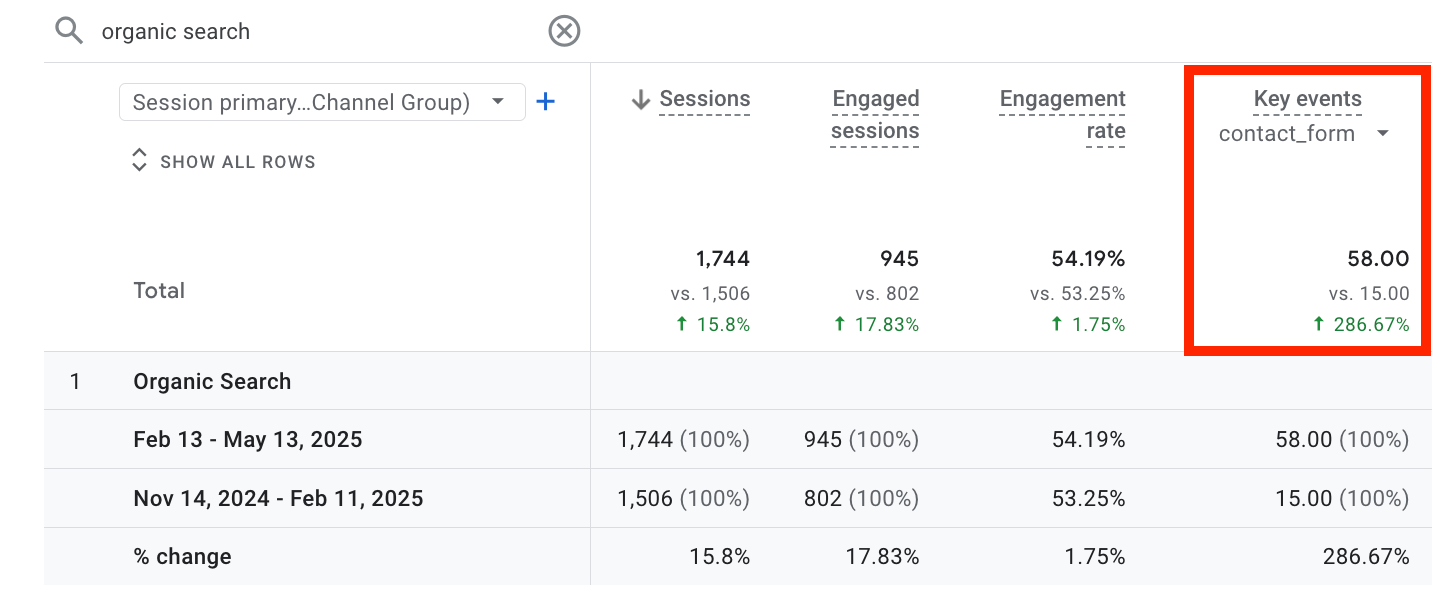
One client site we refreshed grew contact-form conversions by 286% from pages they already owned. We rebuilt the value in their existing content without adding a page, changing the offer, or touching paid acquisition.*
Those pages still had value; they just weren't doing enough with it. A few had lost reader trust, some had drifted from search intent, and others ranked well yet stalled before the next step. Rebuilding that value into the pages themselves is what separates a real refresh strategy from a list of minor updates.
A refresh strategy helps you decide:
- Which existing pages have lost relevance, visibility, trust, or conversion value;
- Which of those still hold value worth recovering;
- Whether each one needs a refresh, rewrite, consolidation, promotion, retirement, or nothing at all; and
- How you'll measure whether the work actually restored performance.
Here’s where this guide fits: use it when you suspect an existing page has lost value and you need to decide what kind of fix it needs.
It will help you spot content decay, understand the likely cause, and choose the right action before rewriting a page that may not need it.
*Proof note: This came from a multi-page refresh programme using our proprietary update process. We refreshed multiple priority pages, improved internal links to reconnect orphaned content, and clarified next steps across the content set. Organic Search contact form key events rose from 15 to 58 across two 90-day comparison periods, a 286.67% lift. Organic sessions rose by 15.8%, so the conversion lift was not explained by traffic growth alone.

Key Takeaways For Your Content Refresh Strategy
- Prioritize pages with value worth recovering: Focus on pages that still support a useful search query, customer decision, business result, internal path, or valuable topic cluster.
- Diagnose before you edit: Work out whether the page has lost relevance, trust, clarity, differentiation, or conversion strength before changing the copy.
- Choose the fix that best matches the problem: Refresh when the page still has the right role. Rewrite, consolidate, promote, retire, repurpose, or leave it alone when another action better addresses the problem.
- Measure against the reason for the refresh: Track the metric that reflects what you were trying to recover, whether that is visibility, engagement, conversions, clearer query ownership, or AI visibility.
Build a Content Refresh Strategy in 7 Simple Steps
A content refresh strategy does not start with rewriting old pages. It starts with deciding which pages still matter, what they have lost, and whether a refresh is the right fix.
Use this workflow to move from “this published date is old” to a clear action plan.
When to Use This Workflow
Use this workflow when you already have one page in mind and need to decide what to do with it.
It works well when a page still ranks but no longer converts, impressions are steady but clicks are falling, two pages compete for the same topic, or an older guide needs better examples, proof, sources, or calls to action.
The goal is to choose the right action for the page.
| Step | What to check | Output |
|---|---|---|
| 1. Establish purpose | Define the job the page should do for the reader and the business. | Page goal - for example, generate qualified organic leads. |
| 2. Detect deterioration | Check which performance or quality signals have changed rather than treating one weak metric as proof that the page needs rewriting. | Deterioration signals - for example, falling clicks despite stable impressions. |
| Priority decision | Decide whether the page is valuable enough to warrant more investment. Weigh its business role and search opportunity alongside the strength of the surrounding topic cluster. | Priority decision - for example, refresh now, monitor, or deprioritize. |
| 4, Diagnose | Compare the page with the current search landscape. Identify whether the main problem is intent coverage, credibility, user experience, differentiation, or guidance. | Problem statement - for example, strong rankings but weak differentiation. |
| 5. Select action | Use the evidence to decide how much intervention the page needs. | Recommended action - for example, targeted refresh, heavy revision, or consolidation. |
| 6. Implement | Change the parts responsible for the problem while protecting what still works. | Refresh brief - for example, update the introduction and replace outdated proof while preserving the existing structure. |
| 7. Measure | Track the metric connected to the original diagnosis and review the result at appropriate checkpoints. | Measurement plan - for example, a 30/60/90-day performance review. |
For a deeper page diagnosis, I recommend trying our framework for how to measure content quality. It helps you score contextual understanding, credibility and freshness, user experience, uniqueness and value-add, and guidance before deciding how much work the page needs.
What Is a Content Refresh?
A content refresh is the process of improving an existing page so it matches what readers, search and answer engines, and the business need from it now. A refresh usually preserves the existing URL and any link equity attached to it, while improving what no longer matches current needs.
A refresh can range from light factual updates to more substantial improvements in how the page is structured, supported, and guided toward the next step. The right scope depends on what the page has lost: relevance, trust, differentiation, usability, or business value.
A content refresh sits between a full content audit and a page-level rewrite.
Use this guide when you already suspect an existing page has lost value and need to understand what kind of problem you may be dealing with.
Use our content audit guide when you need to review a larger content library, compare page performance, and prioritise updates across dozens or hundreds of URLs.
Use our content quality assessment framework when one important page needs a deeper score before you decide whether to refresh, rewrite, promote, repurpose, or retire it.
Use our content update services when you already know important pages are underperforming and need help turning them into stronger search, AI, and conversion assets in the safest possible way.
Why Content Decays for Reasons Besides Age
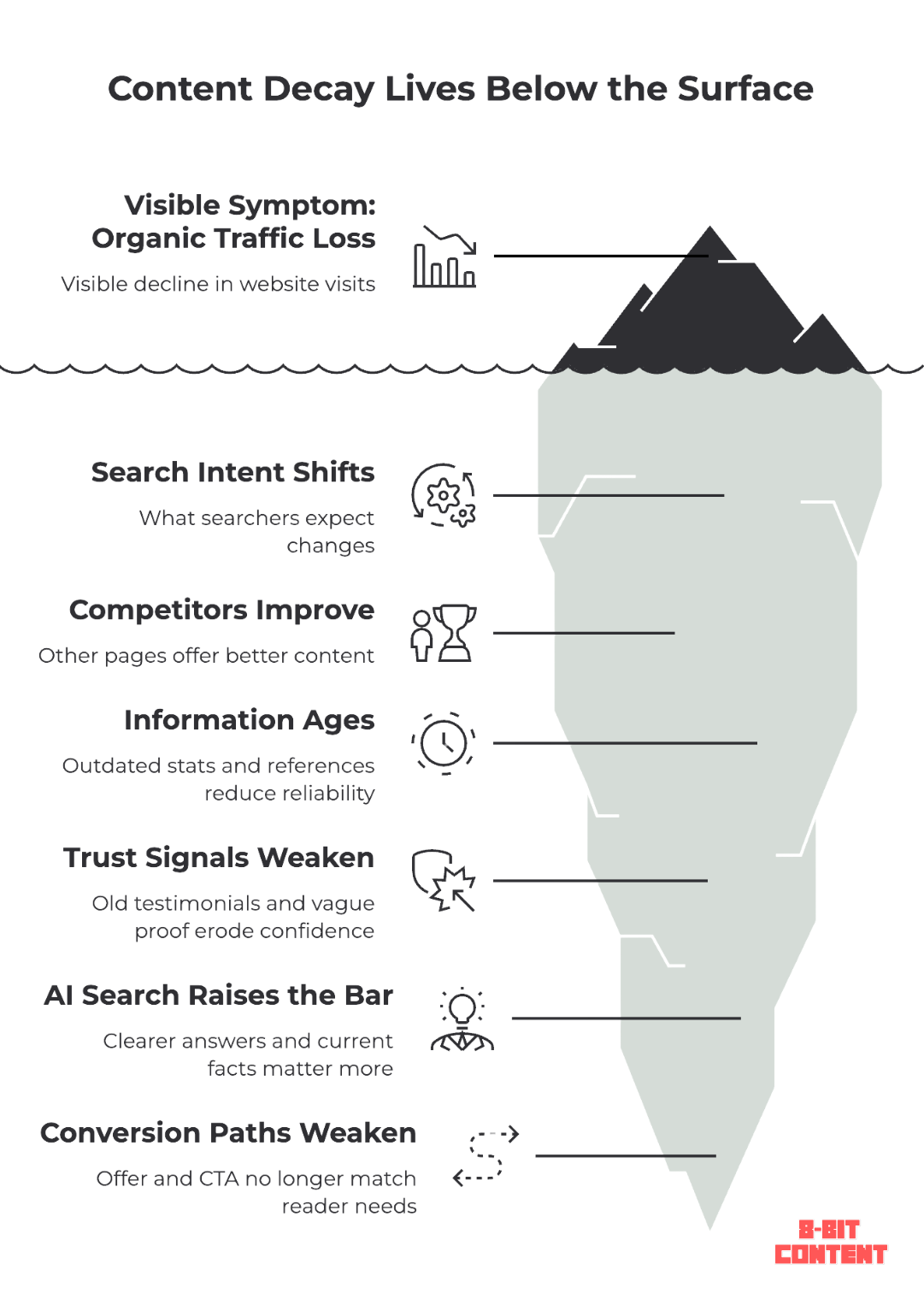
Content decay is the gradual loss of organic traffic, rankings, relevance, conversions, or visibility after a page has been live for a while. Age can make that more likely, but the real problem is usually that something around the page has changed.
A five-year-old page can still work perfectly well. While a much newer page can lose value quickly when search intent moves, stronger competitors appear, its evidence ages, or the next step no longer fits what readers need.
It could be any number of things:
- Search intent shifts: The current search results may reward a different format, angle, or stage of the buying journey from the one your page was built around.
- Competitors improve: Other pages add clearer answers, stronger proof, better examples, or more useful first-hand insight while yours stays the same.
- Information ages: Statistics, screenshots, product references, pricing, tools, and source links can become outdated even when the main argument still holds.
- Trust signals weaken: Dated proof, old case studies, thin evidence, or unclear authorship can make a once-useful page harder to trust.
- Conversion paths decay: The page may still attract the right reader while its offer, internal links, proof, or call to action no longer support the next decision.
- Search experiences change: Search features and answer engines can satisfy more of a query before the click, which can reduce a page’s traffic even when its ranking remains stable.
For example, a 2026 Ahrefs study found that AI Overviews correlated with a 58% lower click-through rate for the top-ranking page (up from 34.5% in its 2025 study). That doesn't mean every query will lose the same amount of traffic, though. But it does mean ranking position alone will no longer tell you whether a page is still creating the same value.
The common mistake is treating the visible symptom as the diagnosis. Traffic falls, so more copy gets added. Rankings slip, so the introduction gets rewritten. A page looks old, so a few statistics get replaced.
We have tried plenty of those quick fixes across more than 1,000 page updates. Sometimes they work. But when they don't, it's usually because the page had a different problem underneath the surface level analysis.
A page may still answer the query but no longer compete with what ranks now. It may still rank but no longer give the reader enough confidence to continue. Another URL may have started competing for the same job.
That is what a content refresh strategy is meant to prevent. And that's why, before editing the page, it's important to establish whether it still matters, identify what has weakened, before then choosing the action most likely to recover its value.
Which Pages Are Worth Refreshing?
Not all old pages deserve a refresh. This section answers the first question: does the page still matter enough to diagnose?
The best candidates are pages that still support a business result or a customer goal. In practice, that usually means favouring topics with a next step: comparison, evaluation, implementation, risk, pricing, examples, templates, or a decision the reader cannot fully complete from the search result alone.
So, start with the page’s job, not the graph. A page may be worth protecting because it helps readers compare options, understand a problem, trust your offer, support a service page, or move toward a decision. It may also deserve attention because it ranks for a useful query, earns links, or supports an important internal path.
Metrics help you find possible refresh candidates, but they should not make the decision for you. Traffic decline, weaker click-through, falling conversions, or ranking movement are clues that something may have changed. They still need to be weighed against the page’s role.
That is why a low-traffic page can still be worth refreshing, while a declining page may not be worth saving. Before judging a page by the graph, check what job it is meant to do.
You can usually spot refresh candidates before the loss becomes obvious. Once you know the page still has a useful job, the signals below help you decide whether it is worth a closer diagnosis. But remember that they are clues and not the decision.
Common signals include:
- Outdated proof, examples, screenshots, or references
- A page that no longer matches the dominant search intent or expected format
- Competitors covering the topic more clearly, credibly, or completely
- UX friction that makes the page harder to use or trust
- Weaker conversion performance even when rankings hold
- Declining visibility or weaker click-through despite stable relevance
None of these signals should make the decision on their own. The point is to spot patterns that suggest a useful page is losing search fit, commercial value, or its ability to help the reader take the next step.
Use this table to separate symptoms from the real refresh problem:
| What you’re noticing | Common wrong assumption | Better strategic question |
|---|---|---|
| Traffic is falling | The page needs more content | Has search intent changed, or has the competitive baseline moved? |
| Rankings are stable, but leads are down | The page is healthy because it still ranks | Does the page still build enough trust to move readers forward? |
| The page feels outdated | Replace old stats and republish | Is the page’s proof, angle, and business role still strong enough? |
| Two similar pages are losing clicks | Refresh both pages | Are the pages competing for the same intent? |
| AI Overviews answer the query | Add more FAQs | Is this query still worth chasing for clicks, or should the page support a different next step? |
| The page has low traffic | Ignore it | Does it support a service page, sales conversation, or internal link path? |
| The page sits in a cluster Google ignores | More refreshes will finally earn the topic some trust | Should we double down on this topic, consolidate it, or exit it entirely? |
The point is not to rely on a single metric. It’s to identify patterns that suggest the page is losing usefulness, commercial value, or search fit. Pull these signals from free tools: Google Search Console, Google Analytics, Bing Webmaster Tools, Microsoft Clarity, and Ahrefs Webmaster Tools.
One weak signal is usually a reason to monitor the page, not rewrite it. Several weak signals on a page with business value are a reason to diagnose what changed.
Zoom Out: Which Topic Clusters Does Google Already Trust You On?
Page-level signals matter, but larger sites should also look at topic-level patterns before deciding what to refresh.
We worked with a large site with content that covered a wide range of topics for various products. The page quality was fairly consistent across the site, but we noticed that the ranking and visibility patterns weren't. Google rewarded certain topic clusters with steady top-five positions and largely ignored others, even when the individual articles were just as strong.
That pattern can help play a role in shaping your refresh strategy. If Google already treats your site as a trusted source for a certain topic, updates within that cluster are more likely to compound. Likewise, if Google has never rewarded a topic cluster, the same level of effort may produce very little, even when the update itself is good.
This means a weak page in a strong cluster is often a good refresh candidate. And a weak page in an ignored cluster may be a better candidate for consolidation, retirement, or no further investment. So, before you spend time improving the page, make sure the broader topic is still worth protecting.
For smaller sites, this may not matter much. If you only have a few dozen pages, it is usually better to stay focused on page-level performance. But once your site has enough content to form real topic clusters, start by identifying which clusters deserve the effort, then diagnose the individual pages inside them.
What a Refresh Diagnosis Should Consider
A refresh diagnosis sits between a full audit and the actual edit. You are not evaluating the whole site or scoring every detail of the page. You are trying to find the part of the page that no longer matches the job it needs to do.
That usually means looking at a few practical questions before deciding what to touch.
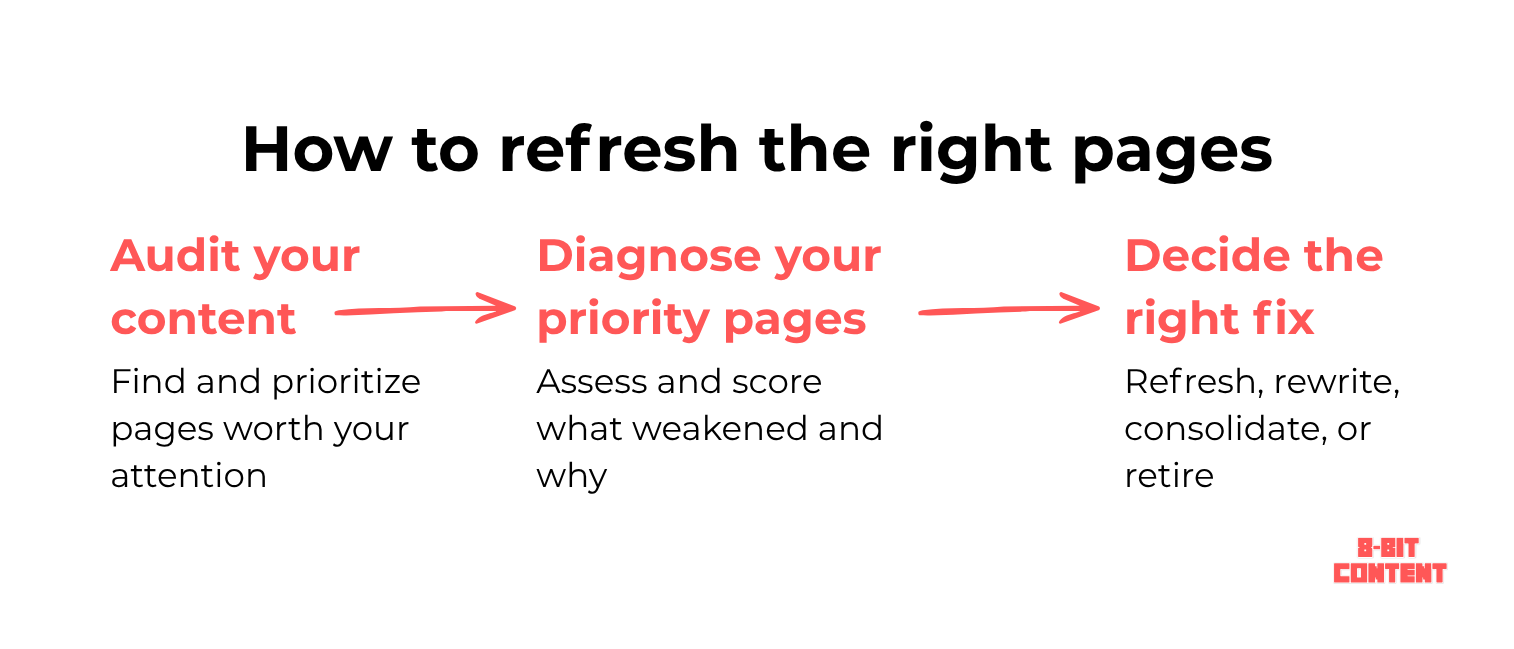
Use the advice and questions below to help determine where the page may have lost value before deciding what to change.
| Area to check | What it can reveal |
|---|---|
| Current search landscape | Compare your page against what currently ranks. Look at the dominant intent, the expected format, and the tools or entities competitors keep referencing. Meet the baseline the search results set before you try to stand out. |
| Contextual understanding | Does the title deliver on its promise? Does the page answer the main query quickly and cover the follow-up questions a reader asks next? |
| Credibility and freshness | Are the facts, examples, stats, and sources current? Does the page carry enough proof, backed by credible references or first-hand experience? |
| User experience | Is the answer easy to find? Does the page flow in an order that builds understanding? Do calls to action, tables, and visuals show up where they help? |
| Uniqueness and value-add | Does the page add anything beyond the current search consensus, through client results, expert commentary, or practical judgment? A page that adds little beyond a generic summary may be less defensible as competitors and search experiences improve. |
| Guidance | Does the page tell the reader what to do next? Does it link to the right resource or commercial page for their stage? |
These map to the five factors in our content quality assessment framework. Use that guide when you need to score a page in full.
A useful gut check: Ask yourself objectively, if this page vanished, would anyone notice a real gap in what's available? In many competitive SERPs, original assets such as proprietary data, tools, research, or distinctive first-hand evidence can strengthen a page’s defensibility.
One study found these assets were common among 92.9% of winning sites, but the exact effect will vary by query and vertical.
Refresh, Rewrite, Consolidate, Retire, Promote, or Repurpose?
Once you know which pages deserve attention, the next step is choosing the right action. Not every declining page needs a refresh. Some need a rewrite, some should be consolidated, and some may deserve more promotion instead of more editing.
For example: Two blog posts, one titled "What Is a Content Audit" and another "How to Run a Content Audit," end up ranking for the same queries and splitting clicks between them. Merging them into one guide and redirecting the weaker URL can reduce intent overlap while also concentrating links, internal signals, and relevance. But the decision should be based on your audit of query, backlink, and conversion data.
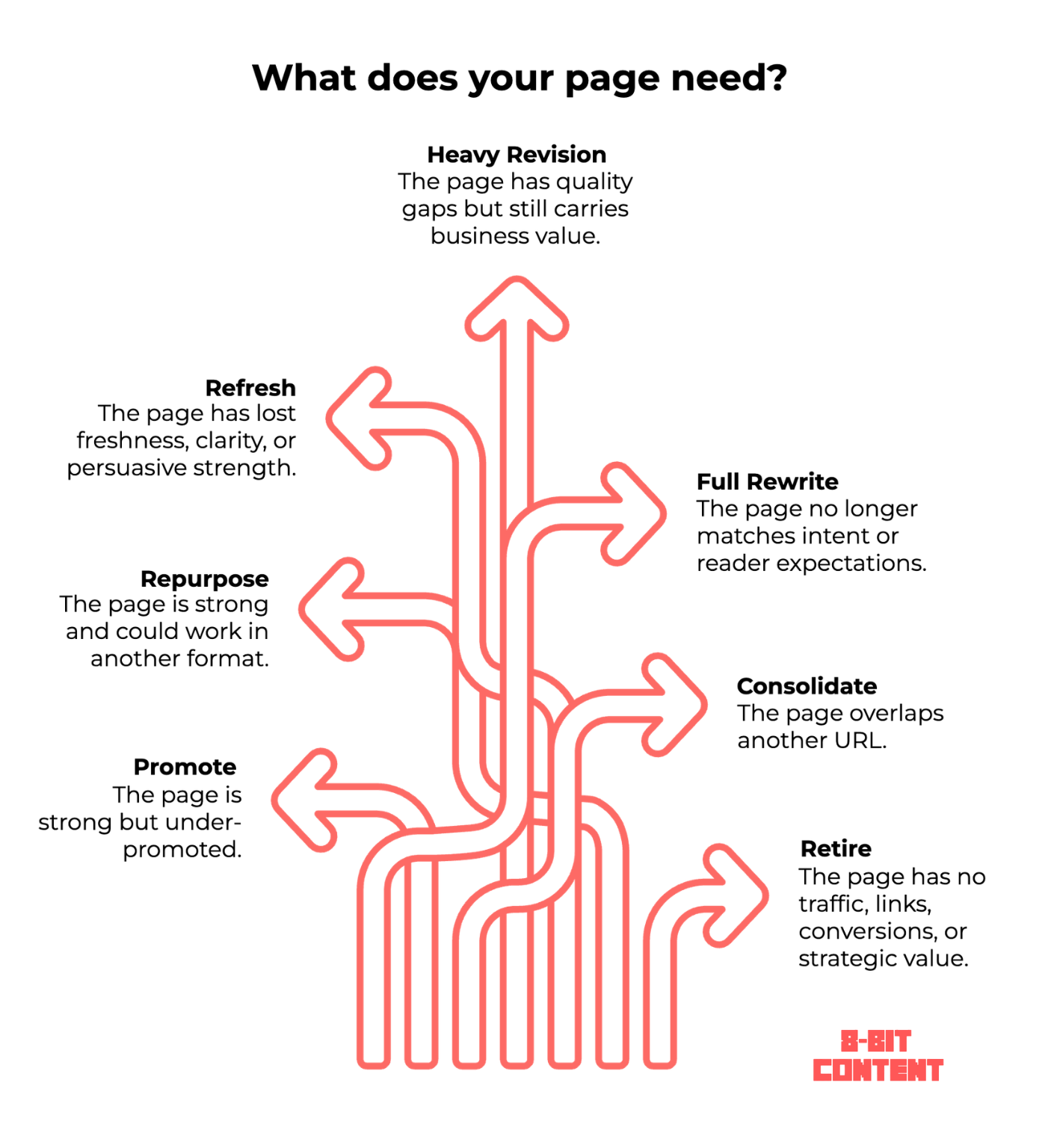
Use the table below to avoid defaulting to “refresh” when the page may need a different action.
| Possible decision | What it means | Priority signals to check | Why the choice matters |
|---|---|---|---|
| Promote | The page is still useful, but not enough people or crawlers are being pointed to it. | The page has strong content quality, a clear business role, and conversion potential, but weak internal links, few backlinks, limited distribution, or low visibility from related pages. | Updating the copy may not help if distribution or internal linking is the real issue. |
| Repurpose | The page contains useful insight that may work better in another format. | The page includes strong examples, frameworks, data, opinions, or explanations that could become social posts, email sequences, videos, lead magnets, sales enablement assets, or supporting sections on other pages. | The original URL may not be the only way to recover value. |
| Refresh | The page still has the right role, but parts of it have aged. | The page still matches intent and supports a relevant topic, but has outdated examples, old data, thin sections, missing follow-up questions, or weaker competitor coverage. | Small updates can help when the core intent and structure still work. |
| Heavy revision | The page still matters, but the structure, proof, or persuasion path is weak. | The page supports a valuable topic or service, but the structure, proof, CTAs, or persuasion path are weak. | The page may need more than factual updates. |
| Rewrite | The page’s angle no longer matches the reader or search landscape. | The URL still has strategic value, backlinks, rankings, or internal-link equity, but the current page misses the dominant intent, targets the wrong awareness stage, or uses an outdated angle. | Keeping the URL may still make sense if it has links, but the page needs a new approach. |
| Consolidate | Another URL may already satisfy the same intent. | Two or more pages rank for similar queries, answer overlapping questions, split internal links, or compete for the same user journey stage. | Updating both pages can make the overlap worse. |
| Retire | The page no longer has traffic, links, conversions, or strategic purpose. | The page has no meaningful organic visibility, no backlinks worth preserving, no conversion role, no internal-link value, and no clear connection to a current offer or topic cluster. | Keeping every old page alive can dilute focus, overall site quality, and maintenance effort. |
As a rough guide to effort, promotion and retirement are usually quick, a refresh often takes an hour or two, heavy revision runs several hours, and a full rewrite can take one to two weeks.
This table shows the possible directions. It does not replace a site-level decision. Consolidation, redirects, retirement, and cannibalization decisions need a wider view of backlinks, internal links, rankings, business role, and URL overlap.
Teams often keep a page alive purely because it holds a ranking, even after it stopped contributing to the business. This is simply sunk cost fear, losing a number that used to matter. If a page isn't earning its keep, its traffic history isn't a reason to save it.
Not sure whether your key pages have a traffic problem, trust problem, conversion problem, or overlap problem?
Check out our free, no-obligation site check. We’ll help identify the first few pages most likely to have refresh upside and show you whether they need a light update or heavier revision.
What's the Difference Between a Content Refresh and a Rewrite?
A content refresh improves a page that still has a useful foundation. A rewrite replaces most of the existing content because the page’s structure, intent, argument, or coverage no longer does the job.
Refresh a page when the core topic and search intent are still right, but parts of it have become outdated, incomplete, or less competitive. Rewrite it when fixing the page would mean rebuilding most of the answer from scratch.
The simplest difference is how much of the existing page is still worth protecting.
| Choose a refresh when… | Choose a rewrite when… |
|---|---|
| The search intent is still the same | Search intent has materially changed |
| Useful sections, rankings, or links are worth preserving | Most of the existing structure no longer supports the query |
| The problem is concentrated in specific sections | The core argument or answer needs rebuilding |
| Targeted changes can close the gap | Most major sections would need replacing anyway |
A useful rule of thumb: if you can clearly identify what should stay before you start, you probably need a refresh. If almost every major section needs replacing, treat it as a rewrite.
For an important or high-business-potential page, you can should make that decision more systematically.
For instance, you can measure the content quality of your pages using our 5-factor framework. If it performs poorly across core areas such as contextual understanding, credibility and freshness, or uniqueness and value-add, a targeted refresh may not go far enough. So, the page likely needs a heavy revision or full redo instead.
How AI Search Changes Refresh Priorities
Updating for AI search means making the page clearer, more current, more trustworthy, and easier to understand outside the context of the full page.
In practice, this changes the emphasis of a refresh more than the fundamentals.
- Make important answers and natural follow-up questions easier to find, especially when AI systems expand the original query into related sub-questions.
- Keep sections interpretable on their own, not just in full-page context
- Support factual claims with current, credible sources
- Use specific entities, examples, and terminology instead of vague generalities
- Improve structure where comparisons, definitions, or decision points need to be clearer
This is where section-level clarity takes priority. A refreshed page should still make sense when someone lands on one section instead of reading from the top.
The idea is not new. Nielsen Norman Group has been teaching section-level chunking for many years because it helps readers understand information in smaller, self-contained pieces. AI search has simply made that discipline more important. When answers are extracted, summarized, cited, or linked from outside the full-page context, each section needs enough clarity to stand on its own.
But it's important to note that none of this guarantees inclusion in an AI Overview, ChatGPT, or any other answer engine. AI search is just another audience reading the same page you already improved for readers.
Why a Ranking Page Can Still Need a Refresh
A page can rank for the right query and still stop doing its job.
Ranking means the page is still visible. But it doesn't mean the page is still persuasive. The page may answer the search query, but no longer give readers enough confidence to take the next step or explore other pages on your site.
A few things cause this:
- Old testimonials weaken trust
- Dated case studies make the page feel less current
- Generic calls to action may no longer match what the reader needs before they act. HubSpot found that personalized calls to action performed 202% better than basic CTAs after analyzing more than 330,000 CTAs over six months.
- Stale screenshots and examples make the offer feel outdated
- Competitors show stronger proof or clearer positioning
- Internal links send readers to the wrong next page, or nowhere at all
A service or product page can still rank for a valuable query while its case studies go stale, its proof no longer reflects the current offer, or its CTA simply says "Contact us."
Good refresh work looks at visibility and conversions together. Judge a page by qualified traffic, leads, sales, signups, and enquiries. Rankings are one signal among several.
Example from our own refresh work: as mentioned in the intro, one high-ticket service client saw contact-form conversions rise 286% after we refreshed existing pages instead of publishing new ones. The lift came from improving what those pages were missing: building trust, supporting the offer, and moving readers toward the next step. We break it down further in our case study.
How Often Should You Refresh Old Content?
There’s no universal refresh schedule, but many teams use review cadences like the following as a practical operating rhythm.
The right update schedule depends on topic changes, search competition, business value, and if organic SEO performance is dropping. More competitive keywords often decay faster, since more sites are actively updating content to compete for the same query.
Freshness also matters when the query itself has a time-sensitive angle. Google has multiple query-deserves-freshness systems designed to show fresher content when current information is expected. That does not mean every page needs constant updates. But it does mean pages about fast-moving products, tools, pricing, recommendations, or reviews should be checked more often because stale examples, old screenshots, dated recommendations, and expired data can make them less competitive when freshness is part of the intent.
Commercial pages deserve regular review because offers, proof, competitors, and buyer expectations all shift over time. Evergreen guides can usually go longer between reviews, but they still need a check whenever rankings, clicks, conversions, or search expectations shift. Larger sites with 100+ content pages also benefit from periodic mini-audits, especially when commercial pages depend on supporting content underneath them.
As a general guide, tie refresh cadence to where the page sits in the journey:
- Decision and commercial pages (BoFu): every 3 months, or sooner when offers, proof, or positioning change
- Consideration content (MoFu): every 3–6 months
- Evergreen and awareness content (ToFu): every 6–12 months, or when performance slips
- Large libraries: recurring mini-audits to surface the pages with the strongest upside
Update because something meaningful changed.
How to Tell If a Content Refresh Worked
A content refresh worked if the page improves against the reason it was refreshed. Judge the result against the original problem, rather than whichever metric happens to move. A page refreshed for weak conversions succeeds on lead lift even if rankings stay flat.
Match the performance metric to the goal:
- Visibility: Track search impressions and rankings. Use clicks and click-through rate to see whether that visibility is producing visits.
- User engagement: Track scroll depth and onward clicks. Interpret bounce rate and CTA interaction against the page’s purpose and previous performance.
- Conversion: Track CTA clicks and form submissions. Use assisted conversions and lead quality to judge downstream value.
- Consolidation: Look for one stronger page taking clearer ownership of the intended queries instead of two URLs competing for them.
- AI visibility: Check whether the page is mentioned or cited in relevant answers. Track whether it appears for the prompts that matter to the topic.
Search performance only tells part of the story. A refreshed page should also help readers complete the next useful task. That may mean comparing their options, moving to a relevant service page, or submitting an enquiry.
Not every refresh is chasing a conversion. Some pages exist to shape how a brand appears in search and AI answers. That includes the language used to describe it, the context it appears in, and whether the page becomes a cited source.
A refresh that improves the metric tied to its original problem has done its job.
Use 30, 60, and 90 days as general checkpoints. User experience and conversion changes may appear sooner. Search improvements can take longer depending on crawl frequency and competition.
If nothing meaningful improves by those checkpoints, revisit the diagnosis. Do not assume the page simply needs more time.
When to Get Help With Content Refreshes
Some refresh work is safe to handle internally. Broken links, outdated screenshots, old statistics, minor formatting issues, and small wording fixes do not need a deep strategic process.
Expert help becomes more useful when the page still has value, but the problem is not obvious. A page with rankings, backlinks, conversions, commercial relevance, or an important role in the wider site can be easy to damage if the wrong thing gets changed.
The risk is not that an internal team cannot edit the page. The risk is that the edit weakens something that was still working, or treats the page as a copy problem when the real issue is intent, proof, overlap, internal linking, or the page’s role in the buyer journey.
8-Bit Content helps identify the pages with the strongest refresh upside, then updates the page so the copy, structure, proof, internal links, and next step match the job it needs to do.
Choose the Right Next Step
A content refresh strategy only works when the next action matches the page’s actual problem.
Use one of these three paths depending on what you need to decide next.
1. Run a full content audit
Use this when you need to review a large content library, compare page performance, spot decay patterns, and prioritise updates across dozens or hundreds of URLs.
Start by asking:
- Which pages should we update first?
- Which pages should we consolidate or retire?
- Which pages are losing traffic, leads, or strategic value?
- Where are we wasting crawl budget or maintenance effort?
Read our full guide if you'd like to know how to do a full content audit yourself.
2. Score one important page
Use this when one page matters, but you are not sure whether it needs a light update, heavy revision, or full rewrite.
Review your priority pages while asking yourself these key questions:
- Does this page still satisfy the search intent?
- Is the page credible, useful, and fresh enough?
- Does it add anything competitors do not?
- Does the page structure offer a great user experience?
- Does it guide readers to the right next step?
Use our content quality assessment framework to score the page before you rewrite it.

3. Get help refreshing priority pages
Use this when you already know which pages matter, but need help turning them into stronger search, AI, and conversion assets.
Start here if you need help with:
- Reworking structure and search intent alignment
- Updating old examples, claims, and sources
- Adding missing proof, expertise, and internal links
- Improving CTAs and next-step guidance
- Refreshing pages without losing the value they already have
Book a
free site check and we’ll help identify which pages deserve attention first.
Content Refresh Strategy FAQ
Should you refresh content or create new content?
Refresh when the page already has search history, backlinks, or relevance worth preserving. Create new content when the topic, intent, or audience need is different enough that an existing page can't reasonably stretch to cover it, and a new page would strengthen your topic cluster.
What is information gain, and why does it matter for a refresh?
Information gain is the practical idea of adding something useful beyond what already ranks: a new example, original data point, expert judgment, screenshot, framework, or implementation lesson.
Google has patents related to estimating information gain, and its current guidance also encourages unique, non-commodity content. So even if you treat information gain as an editorial standard rather than a confirmed ranking lever, it is still one of the best ways to make a refresh more valuable.
Do you need to change the URL when refreshing a page?
No, in almost all cases, you should not change the URL when refreshing a page. Keep the existing URL whenever possible. It's already carrying backlinks, indexation, and ranking history you don't want to lose. Redirect the URL only when you're consolidating it into another page.
How do you use Google Analytics and Search Console data to choose which pages to refresh?
Google Search Console shows the pages losing impressions, clicks, or ranking position over time. Analytics shows which of those pages are still getting traffic but converting or engaging worse than before.
Cross-referencing both turns page selection into a data decision instead of a guess. Our content audit guide walks through the specific reports and engagement metrics to pull.
Can a content refresh hurt your rankings?
A content refresh can hurt your rankings if the refresh changes the page's core topic or intent too abruptly, or removes content that was already ranking well for secondary queries. A staged rollout and before/after tracking reduce that risk.
Is it safe to use AI to help refresh content?
Yes, AI can help with a content refresh, but it should not be the refresh. Google’s quality guidance focuses on whether the page shows useful effort, originality, accuracy, and value for readers.
So an AI-assisted refresh is fine when it helps you improve the page. A refresh that only paraphrases what is already ranking, without new proof, examples, or judgment, is unlikely to make the page meaningfully stronger.
Should I change the publish date after a content refresh?
Usually, keep the original publication date and add a separate “Last updated” date when you make substantial changes to the page.
Do not change the date for minor edits or simply to make an old page look fresh. If your content management system supports both fields, keep the original publication date and record the meaningful refresh in the updated date. Keep those visible dates consistent with your
datePublished
and
dateModified
structured data.
Refresh the Pages That Already Have Value
A good refresh protects the pages you have already paid to build. An older page has often done the hard part already: it earned links, got indexed, and found a place in your topic.
That is why the decision matters. The wrong refresh wastes time. The right one protects the page’s existing value and gives it a better chance of contributing again.
Start with a free site check. We’ll review your live pages, identify where refresh work is most likely to produce meaningful upside, and show you which pages deserve action before you spend time updating the wrong thing.

About Will James
Will is a content strategist and co-founder of 8-Bit Content. He helps businesses get more from their content and has spent more than a decade working across search, publishing, and marketing. In his free time, he’s almost certainly with family and friends, off on an adventure, learning something new, or trying to get a cat’s attention.

About Joshua James
Joshua is an education leader and co-founder of 8-Bit Content. He has spent more than 15 years helping schools grow, strengthen their digital presence, and create safer learning environments. In his free time, he’s usually with his two kids, taking on a new challenge, or pretending he has reached the end of his to-do list.



Let’s grow your online visibility together!
Get practical content tips and checklists
Contact Us
You can also find us here:
