
SERP Intent Finder Extension
Understand any SERP in 1 click
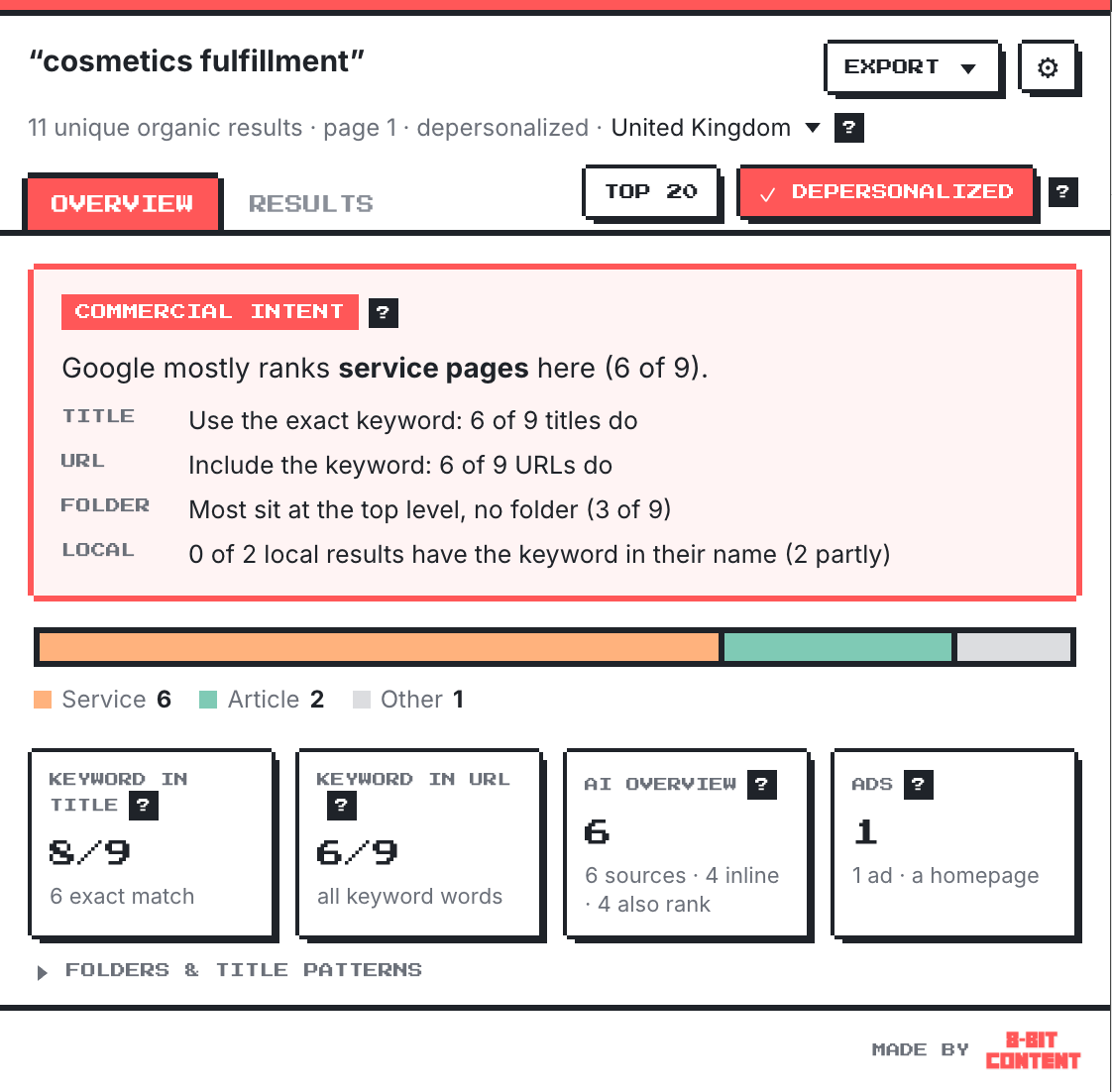
See which page types dominate, how the top pages use the keyword, and who the AI Overview cites.
Free · No sign-up · Nothing leaves your browser
Works in Chrome, Edge and Brave
Why I built this
An “easy win” that ended in tears
Search Console showed one of my service pages getting lots of impressions for a closely related search: the same phrase with one word swapped. It looked like an easy win, so I updated the page to target both. Instead, I lost visibility for both.
The search results could have saved me the trouble: nearly every page ranking for that second phrase had it in its slug and title. A strong signal that Google favored dedicated pages for that search.
But Google doesn't always show full URLs in its results, so slugs are easy to miss. That's why I built this tool, and now I check the SERP before I change anything.
Better decisions
Make more informed SEO decisions.
Most SEO mistakes aren't bad content. They're the wrong page for the search.
Search Console & keyword tools
Tell you what people search for.
The SERP
Tells you what Google expects to rank. SERP Intent Finder reads it for you.
How it improves your decisions
- Evidence instead of assumptions: “13 of 19 results are service pages” instead of “it feels commercial”.
- A check before the commitment: one click costs seconds. The wrong page costs weeks of writing, development, redirects and lost rankings.
- The same answer every time: page types come from fixed rules, so everyone on a team reads a search the same way.
- Easy to share: export the evidence for a client, a manager or a brief.
Mistakes it helps you avoid
- Merging a keyword into a page when Google treats it as a separate topic
- Writing a blog post for a search where Google only ranks service pages
- Building hundreds of programmatic pages for a pattern Google doesn't reward
- Refreshing a page when freshness isn't what's winning
- Fighting a SERP full of directories or forums, when getting listed would work better
- Retargeting a page that ranks, based on impressions alone
It won't guarantee rankings. It shows you what's ranking now, so your next change is based on evidence instead of a guess.
Who it's for
Anyone who decides what page to build
In-house SEO & content leads
Decide the page type, and whether to merge or split, before committing writer and developer time.
Agencies & consultants
Back up recommendations with evidence in audits, briefs and pitches, instead of “in my experience”.
Content strategists & writers
Know the format, title conventions and URL pattern before the first draft.
Founders & small-business marketers
Check a search in one click before paying for a page, without an SEO tool subscription.
Site architects & developers
See which URL structures rank before planning folders, hubs or pages at scale.
What you see
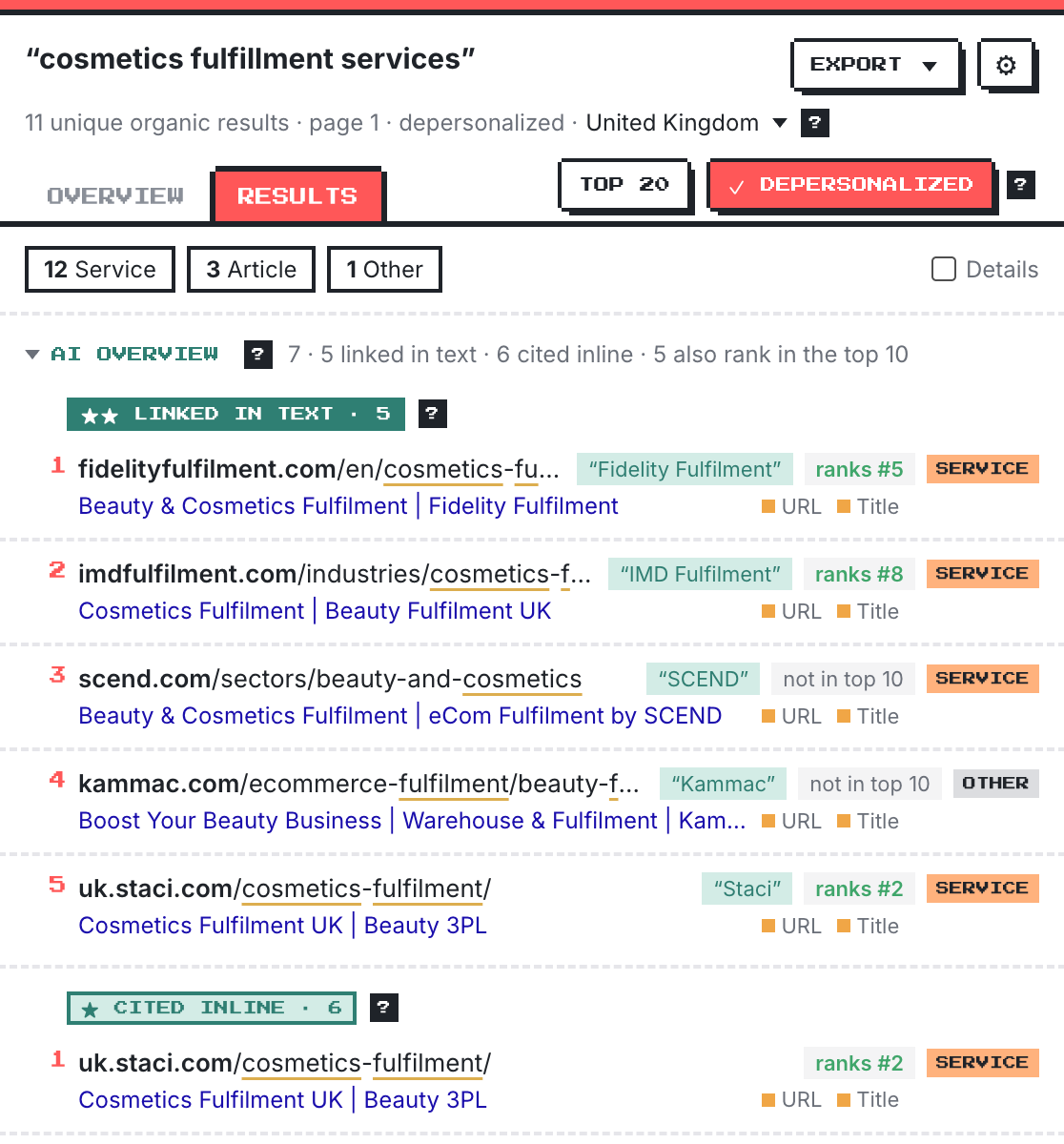
Every result, broken down
- Page types for every result: service, article, product, homepage, directory, forum, social or video
- Keyword in URL and title, including exact-match domains and where the keyword sits
- AI Overview sources: linked in the text (with the exact linked words), cited inline or only listed, and whether they also rank
- Local pack and videos, whenever Google shows them
- Dates Google shows, coloured by freshness
- site: checks on any competitor: all their pages on the topic, or the exact phrase only
- Settings to switch the AI Overview, local results, videos and ads in or out
AI Overviews
See which pages are linked, cited, or sourced in AI Overviews —and where those pages rank organically
Not every source gets the same visibility. SERP Intent Finder sorts them by how prominent they are, and checks each one against the organic results.
A name or phrase in the answer itself links to the page, so it reads like a recommendation. You see the exact linked words.
A small source chip next to a statement, visible without expanding the overview.
Listed in the sources panel, which is often hidden until someone expands it.
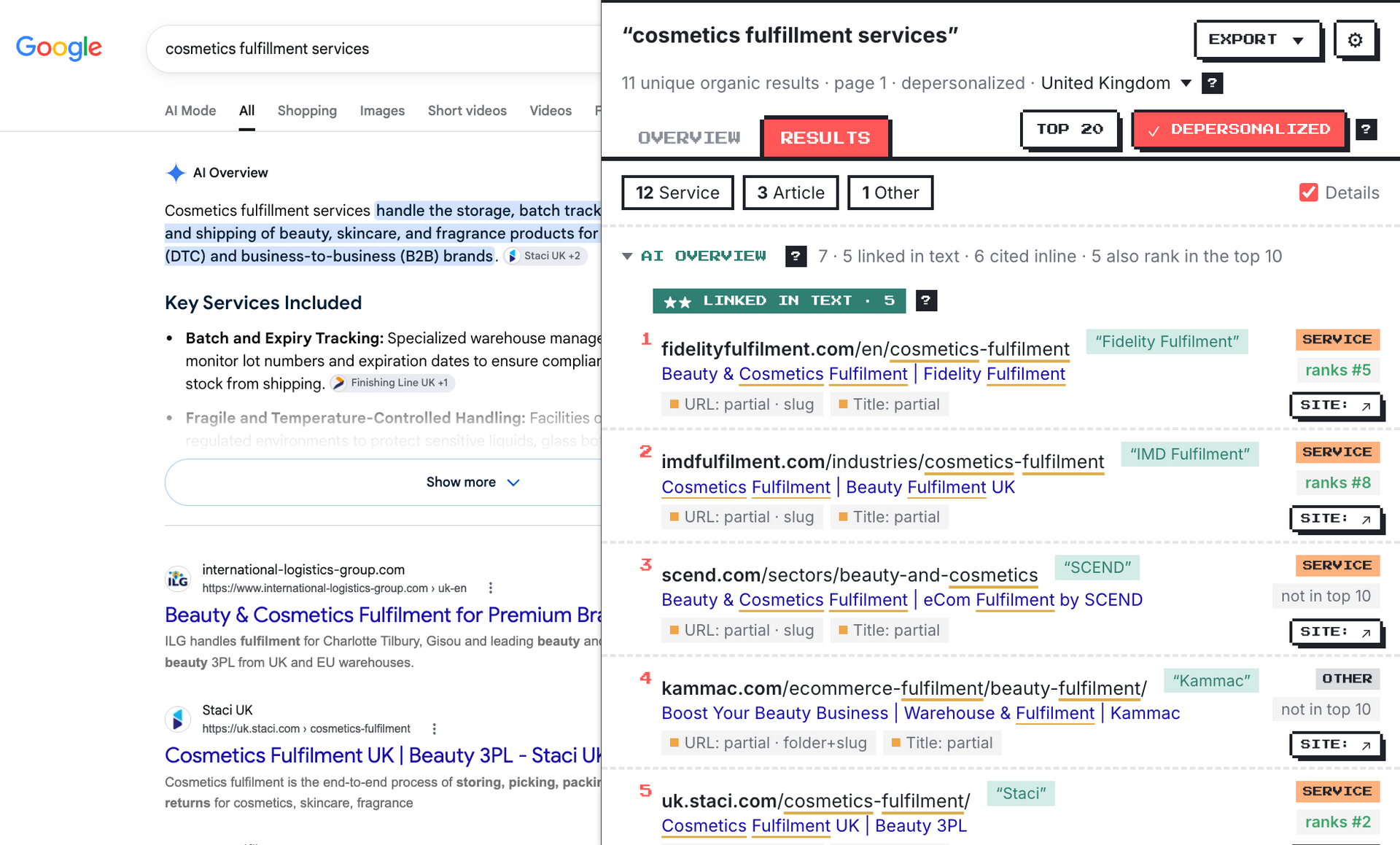
“ranks #5” means the same page also appears in the organic results. “not in top 10” means the AI Overview cites a page that doesn't rank, which is a different way to be seen.
Beyond the 10 blue links
See the key elements of the Google results page
Each section appears only when Google shows it, and you choose what's included in Settings.
AI Overview
Who's linked in the answer, who gets a source chip, who's only listed, and which cited pages don't rank in the top 10.
Local pack
Each business's rating, category and website, whether the keyword is in its name, whether its site also ranks, and which listings are sponsored.
Videos
Platform, channel, length and date for each video in the carousel, and whether its title uses the keyword. A carousel means Google expects video here.
Ads
The page types advertisers send traffic to, and whether they also rank organically. Read from the page only, never clicked.
Any market
See what's ranking wherever it matters
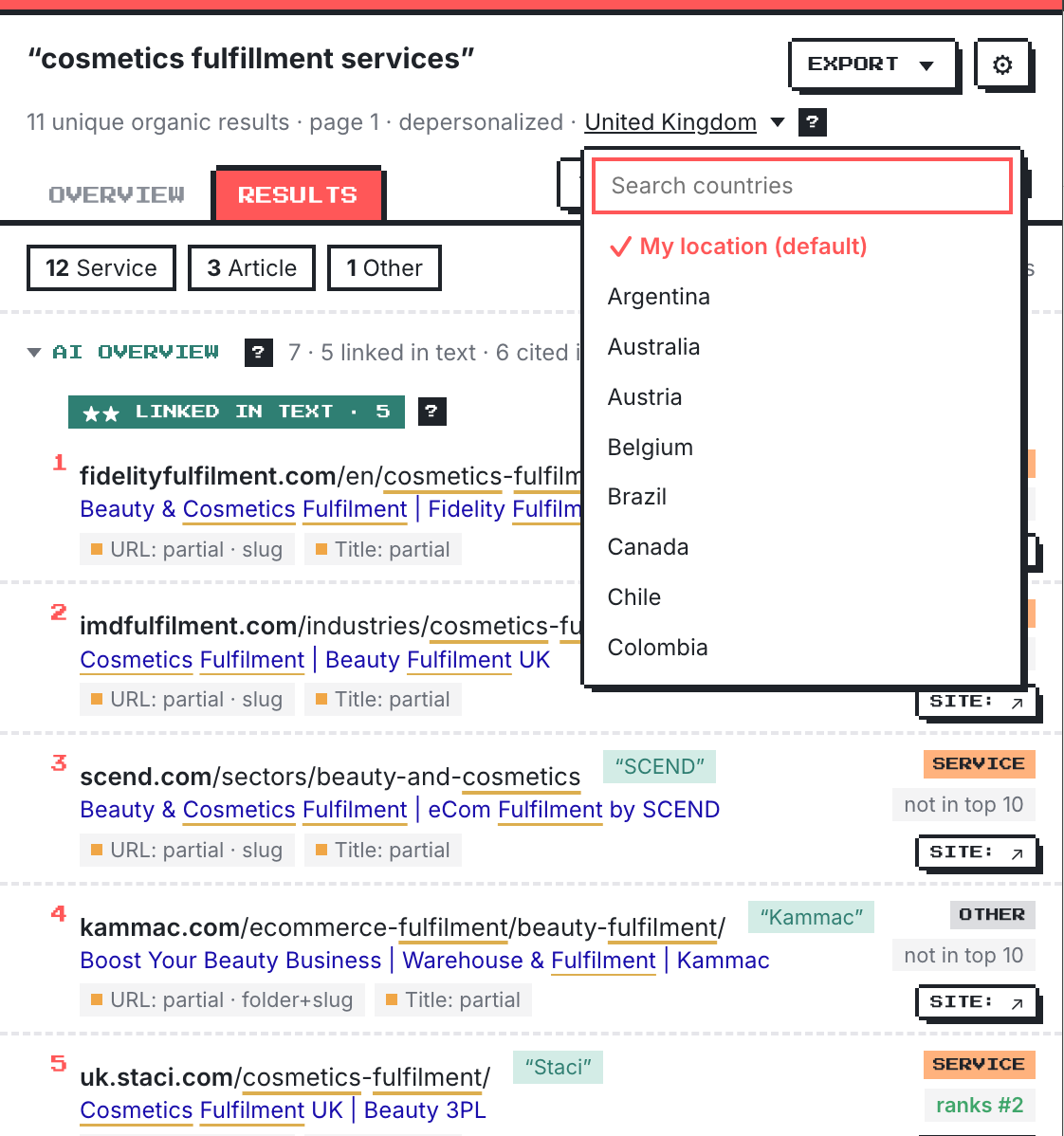
- 50 countries: Switch locations in a click, without a VPN
- Depersonalized results: Reduce personalization to get a more consistent view of the SERP
- Top 20 Expand your analysis to include page 2
- Works across Google domains: google.com and 40+ country domains, in English, French and other languages
- Export to Sheets or CSV: Compare results from different searches, countries or dates in one spreadsheet
Use cases
Questions it answers in seconds
Before you build a page
- Is this keyword worth targeting? See whether homepages and exact-match domains own the top 10, or whether there's room for a focused page.
- What kind of page should you build? See which page types dominate before you write.
- Homepage or dedicated page? If homepages dominate, target the keyword on your homepage.
- Which format wins? Lists, year-stamped guides or question-led titles.
Before you edit, merge or retarget
- Does this keyword need its own page? If ranking pages use the phrase in their slug and title, broadening an existing page can cost you both rankings.
- Can two keywords share a page? Run both searches, including spelling variants. Different pages ranking? Separate opportunities.
- Is the page type the real problem? Check before rewriting copy or building links.
When you set up the page
- Slug and title: how many ranking pages use the full keyword?
- Site structure: /services/, /industries/, /locations/ or the root?
- Pages at scale: test a few searches before launching 300 “[service] for [industry]” pages.
- New markets: does each of 50 countries expect the same kind of page?
- Better briefs: page type, title and URL patterns, not just “commercial intent”.
Beyond your own site
- AI Overview visibility: who's linked, who gets a chip, who's only listed, and who doesn't even rank.
- Outreach targets: the “best companies” lists and directories that rank.
- Third-party visibility: when Reddit or forums dominate, contributing may beat a new page.
- Paid vs organic: where advertisers send traffic, and what organic results miss.
- Local visibility: do the map results favour businesses with the keyword in their name?
- Video opportunity: is there a video carousel, and could a short video earn a spot?
Keep pages performing
- Refresh or leave it? See whether recent pages are winning.
- Track SERP changes: export snapshots and compare over time.
- Spot cannibalization: your site ranking twice, or the AI Overview citing a different page of yours.
- Competitor footprint: a single page on the topic, or a whole cluster?
For client work
- Recommendations you can defend: “15 of the top 20 are dedicated service pages” beats “I think this should be a service page”.
- Live sales calls: show a prospect in seconds why their page doesn't match what ranks.
FAQ
Good questions
Does it click ads?
No. Sponsored results are read from the page only, so the extension can't register an ad click.
Does it send my data anywhere?
No. Everything runs in your browser, and it only reads Google results pages when you click the icon. Exports go to your clipboard or Downloads folder, nowhere else.
Does it work outside the US, or in other languages?
Yes. It works on google.com and 40+ country domains, and you can switch the same search to any of 50 countries. Page types are tuned for English, so other languages may show more “Other”.
Can I leave out ads, local results or videos?
Yes. Open Settings (⚙) and untick the AI Overview, local results, videos or ads. They're left out of the Overview, the Results tab and the export.
Does it work in Microsoft Edge?
Yes. Install it from the Chrome Web Store in Edge: the first time, Edge asks you to allow extensions from other stores, which takes one click. It also works in Brave and other Chromium browsers.
How are page types decided?
From each page's URL and title, using fixed rules (no AI). They're fast but not infallible.
Where do the dates come from?
They're the dates Google shows on results, usually when a page was published or last updated. Google only shows them for some results.

Check the SERP before you change the page
Free · No sign-up · Nothing leaves your browser
Works in Chrome, Edge and Brave · Privacy policy