
What Is Copyediting? A Practical Guide for Content Teams
Copyediting improves the clarity and accuracy of a near-final draft while keeping it consistent and easy to read. It focuses on sentence-level fixes and house style before the final proofread.
This guide is for content teams and anyone else who needs a practical way to review and improve content before publication. We’ll show you where copyediting fits in the creation process, then cover how it works and what to look for when hiring an editor.
This guide reflects the copyediting process we used while managing production of more than 100 articles per month across multiple editors and dozens of authors. At that scale, solid copyediting systems were what made consistent quality possible.

Copyediting vs. Proofreading
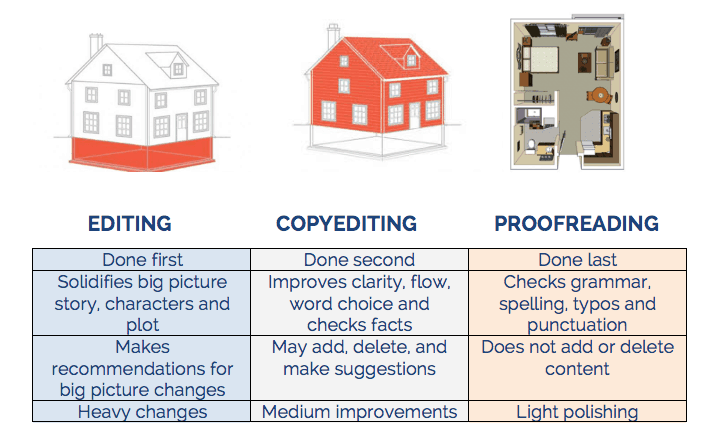
Copyediting and proofreading happen at different stages and solve different problems.
Copyediting takes place once the main argument is settled and the draft is close to final. It improves the language and makes the draft more consistent before proofreading.
Proofreading takes place after editing and, in many publishing workflows, after the content has been formatted. It catches the remaining errors before the content is published.
The full editorial process may include four stages:
| Editing stage | What it focuses on | Typical changes | When it happens |
|---|---|---|---|
| Developmental editing | The overall argument, structure, coverage, and audience | Reorganising sections, filling gaps, cutting irrelevant material, and changing the overall direction | Early in the writing process |
| Line editing | How ideas are expressed at the paragraph and sentence level | Improving clarity, tone, flow, transitions, rhythm, and word choice | After the main structure is settled |
| Copyediting | Accuracy, consistency, grammar, spelling, punctuation, terminology, and house style | Correcting errors, applying the style guide, checking terminology, and resolving inconsistencies | When the draft is close to final |
| Proofreading | Final errors in the edited and formatted version | Fixing typos, spacing, broken formatting, missed edits, and layout issues | Just before publication |
The boundaries can vary between editors and organisations. Some projects combine line editing and copyediting, especially for website and marketing content.
That is why the scope needs to be clear before the work starts. Otherwise, a copyedit can quickly turn into work that belongs in another editing stage - like a rewrite, fact-check, or structural edit.
Automated tools can help flag common writing and style issues before a human checks the details. They still cannot judge whether each change fits the meaning and context of the draft.
Here's a helpful graphic for the common editing process:
What Does Copyediting Include?
The exact scope of copyediting depends on the content and agreement.
But a typical copyedit may include:
- Grammar, spelling, punctuation, and usage
- Sentence clarity and flow
- Tone and terminology
- Internal consistency
- Headings, lists, tables, and formatting
- Names, dates, figures, and basic factual queries
- House style and regional language conventions
- Links, captions, and references when they are part of the scope
For website content, copyediting may also cover headings and other on-page elements when they’re part of the scope.
Copyediting usually doesn’t include major rewriting or research unless agreed, and the final proofread is still a separate step.
Clear scope becomes more important as production grows. It helps writers and editors apply the same standards across every article.
What’s a Style Guide?
Style guides are essentially the standard operating procedures, or SOPs, for how your content team writes and edits.
They set the rules writers and editors follow across a publication. This helps keep your content consistent and gives everyone the same standard to follow.
At scale, you cannot rely on everyone remembering the same preferences. The guide gives writers and editors one place to check the rules.
A practical style guide might cover:
- Canadian, British, or American spelling
- Capitalisation
- Punctuation
- Numbers and dates
- Headings, lists, and tables
- Brand and product names
- Tone and voice
- Source and citation requirements
- Terms your organisation uses or avoids
Search-Focused Style Rules
For website content, a style guide can also include search-focused editorial standards. These help writers and editors apply the same approach across every page.
You might document rules for:
- Title tags and meta descriptions
- URL slugs
- H1, H2, and H3 headings
- Internal links and anchor text
- Image file names and alternative text
- Capitalisation of products, services, and topic terms
- Natural use of the primary topic and related terms
- Calls to action
- Definitions, summaries, and comparison sections
- Publication and review dates
For example, the guide might explain how long or descriptive URL slugs should be so they’re still clear and easy to scan.
It can also explain when question-style headings make sense or when a page should show a review date.
A style guide can also support AI-assisted editing. Give AI tools the same rules your team follows so their suggestions stay consistent with your style.
These checks can support the copyedit when the scope includes them but they do not replace topic research, technical search engine optimisation, or content strategy.
Examples Of Style Guides
The Economist style guide is a great example. It opens with an important note for any B2B copyeditor to keep in mind. It also helps to illustrate the kinds of things you find in a style guide.
“The first requirement of The Economist
is that it should be readily understandable. Clarity of writing usually follows clarity of thought. So think what you want to say, then say it as simply as possible.”
Dreyer’s English is another helpful reference. It was written by long-time Random House copy chief Benjamin Dreyer, who has copyedited hundreds of acclaimed books.
Choose a base guide, then document where your organisation’s house style differs.
Your guide can settle big questions, such as tone and voice. It can also answer smaller recurring questions, such as whether to use a numeral or spell out the number.
When the same editorial question comes up more than once, add the answer to the guide. That turns one editor’s decision into a standard the whole team can apply.
The Copyediting Process
Copyediting works best when you follow a repeatable process.
Solid systems make it easier to keep quality consistent, even when lots of people are involved. They also reduce subjective decisions and help everyone work from the same standards.
This is the process we used to keep quality consistent across a large publishing programme. The exact steps may change depending on the content and scope.
1. Confirm The Scope
Start by getting clear on what the copyedit includes.
Check:
- The target audience
- The purpose of the content
- The agreed level of editing
- The style guide
- The regional language standard
- The file format
- The deadline
- Any search-focused requirements
Confirm whether the brief also includes fact-checking or formatting before you start.
2. Read The Full Draft (out loud)
Read the full article before editing individual sentences.
I highly recommend reading it out loud.
This helps you understand the argument before you start fixing individual sentences. And reading it out loud makes clunky writing and larger issues easier to spot.
Here's a little hack if you ever feel too tired to read out loud:
Highlight the text, right click, and press print.
Save it as a PDF.
Go into your downloads, again right click, and press open with Microsoft Edge.
Here you can use the read aloud feature to transform your life.
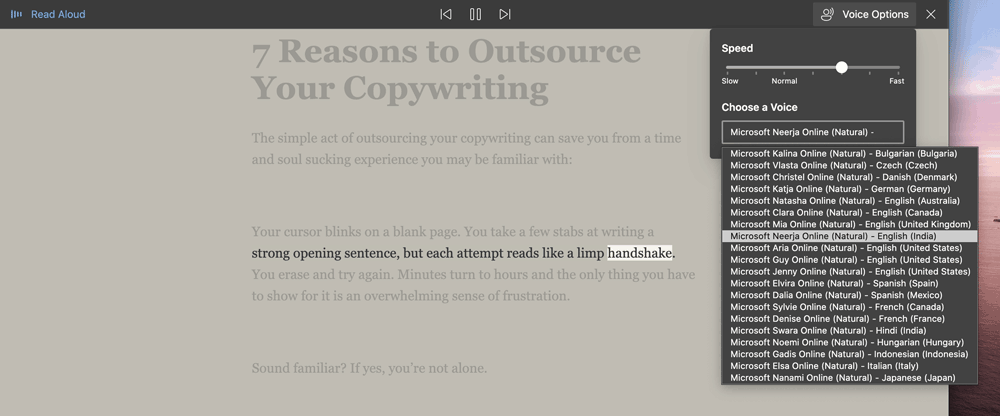
Choose a voice and speed that fits your preference. You can change it to nearly any accent you can think of.
Look for:
- Repeated information
- Missing explanations
- Sudden changes in tone
- Inconsistent terminology
- Sections that appear out of order
- Claims that need clarification or support
Flag larger problems before making detailed edits. A weak sentence may be a symptom of a wider issue in the section.
3. Edit For Clarity
Review each sentence based on what it needs to communicate.
Ask:
- Does it express one clear idea?
- Could the reader misunderstand it?
- Does every word contribute?
- Does it repeat something already explained?
- Does it use language the audience understands?
- Can you start a sentence with rather? ;)
Cut words that do not support the meaning. Split sentences when several ideas compete for attention, then check that each sentence leads naturally into the next.
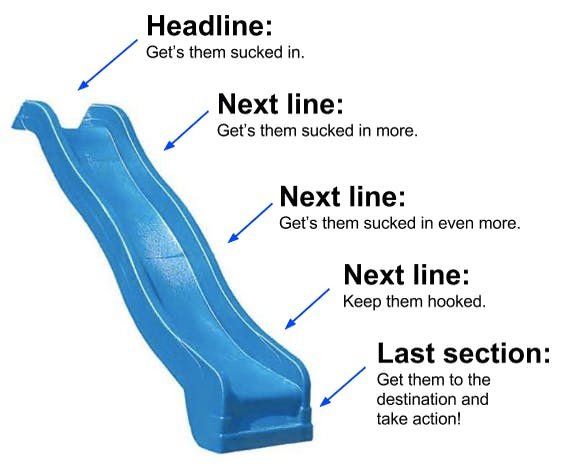
In his book The Adweek Copywriting Handbook, Joseph Sugarman, perhaps my personal favourite copywriting and marketing instructor, described this forward movement as the slippery slide. That each sentence should make the next one easy to read.
Keep the writer’s voice where possible. The goal is to improve clarity without making every author sound the same.
4. Check Grammar, Spelling, And Usage
Correct the obvious language errors first, especially anything that makes the sentence unclear or inaccurate.
Apply the agreed language standard consistently. Different versions of English follow different rules, so stick to the one named in the brief.
For Canadian English, that may include forms such as:
- Colour
- Defence
- Emphasise
- Optimise
- Programme
Editing tools can help flag possible problems. Review each suggestion in context before accepting it.
5. Check Punctuation
Review punctuation based on whether it changes the meaning or makes the sentence harder to read.
Punctuation should make the meaning easier to follow. And it can also affect tone and pacing.
For instance, Cormac McCarthy’s The Road uses sparse punctuation as a deliberate literary choice. While business and website content usually need more conventional punctuation.
Punctuation can also support tone and pacing in promotional copy. Use it deliberately, then follow the selected style guide instead of relying on personal preference.
But for work comms it's best to follow the selected style guide instead of relying on personal preference.
6. Check Consistency
Compare recurring details across the full article.
Here you'll check:
- Names and job titles
- Company and product names
- Capitalisation
- Numbers and dates
- Heading formats
- Lists and tables
- Links and anchor text
- Abbreviations
- Repeated terminology
- Calls to action
Take note of recurring decisions in the style guide or project style sheet. This helps other writers and editors apply the same standard.
7. Review Search Elements When They Are In Scope
For website content, the copyedit may also include search-focused checks.
Review:
- The page title
- Title tag and meta description
- URL slug
- H1, H2, and H3 headings
- Internal links
- Anchor text
- Image alternative text
- Definitions and summary sections
- Publication and review dates
These checks should support the reader and the purpose of the page. They do not replace keyword research, technical search engine optimisation, or content strategy.
8. Raise Editorial Questions
Flag anything you can’t confidently resolve yourself or that needs the writer’s input.
A useful editorial query should explain the problem and give the writer a clear next step. But just be sure to keep the feedback respectful, specific, and focused on the work.
For example, a weak response would be:
This section is confusing. Please rewrite it.
While a useful editorial query would be:
This section introduces three ideas before stating the main point, which makes the recommendation hard to follow. Could you please rewrite it using BLUF (Bottom Line Up Front) to lead with the recommended action, then move the supporting context into a second paragraph?
It's best to not rewrite by instinct when the change could alter the writer’s meaning. Explain the problem and let the writer confirm the intended direction. This respects the writer’s abilities and keeps the edit collaborative

9. Complete A Final Read-Through
Read the edited article from beginning to end, again out loud for total confidence.
You can also read it aloud or use a text-to-speech tool. Listening often reveals:
- Missing words
- Repeated words
- Awkward transitions
- Unnatural sentence rhythms
- Sudden tonal changes
- Errors introduced during editing
Finish by checking the article against the brief and style guide before you call it done.
Download Your Copyediting Checklist Here
Which Tools Can Support Copyediting?
Copyediting tools can speed up routine checks and help you spot issues you may have missed.
But each tool applies its own rules and assumptions. The copy editor still needs to decide whether a suggestion actually improves the draft.
Grammarly
Grammarly can catch routine language issues that are easy to miss when you’re editing quickly. And it can also suggest sentence and paragraph rewrites.
It works well as an initial check, especially when you need to catch repeated errors across a large volume of content.
Review each suggestion before accepting it. A grammatically correct rewrite can still make the draft worse if it changes the meaning or voice.
Hemingway Editor
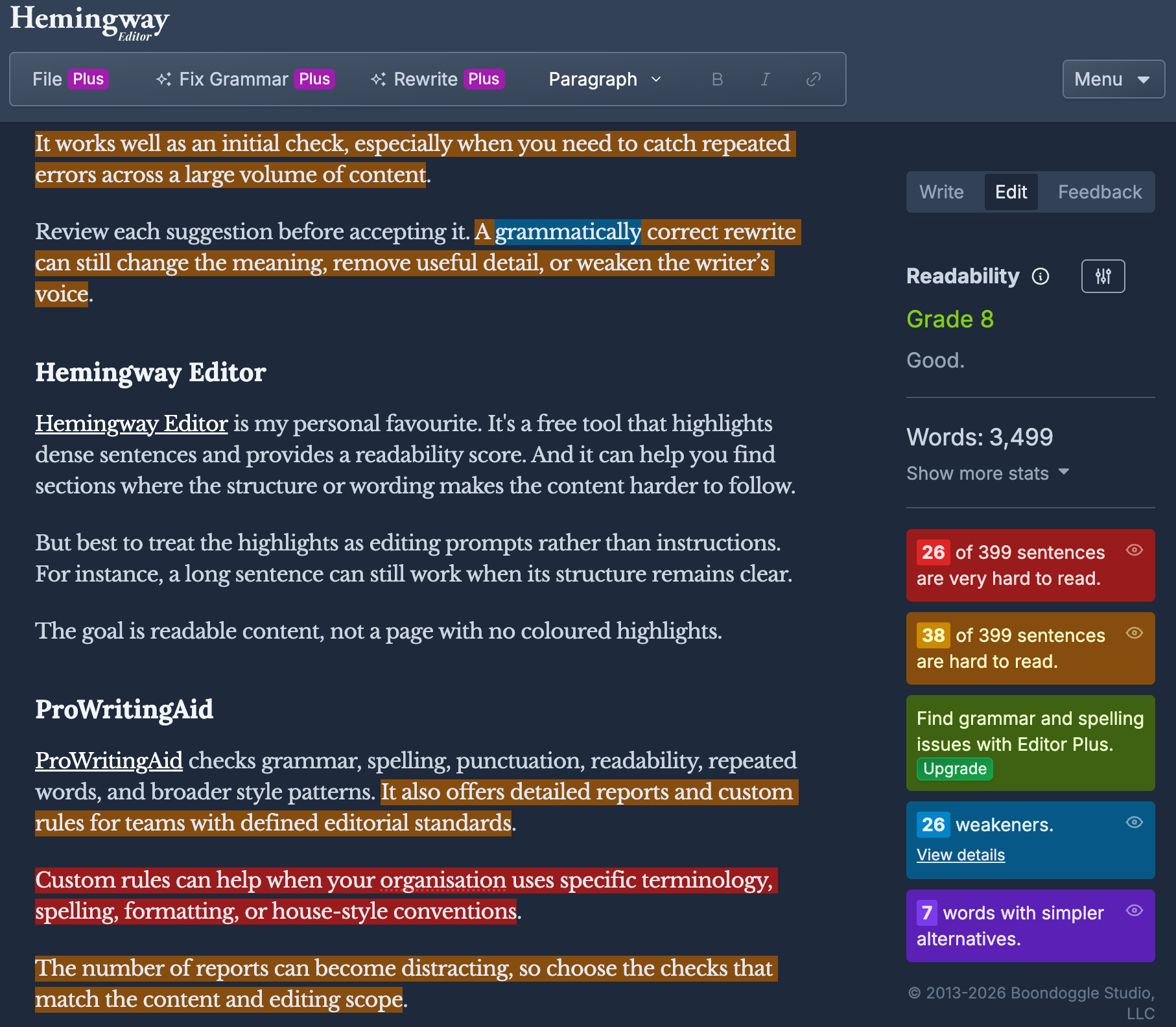
Hemingway Editor is my personal favourite. It's a free tool that highlights dense sentences and provides a readability score. And it can help you find sections where the structure or wording makes the content harder to follow.
But best to treat the highlights as editing prompts rather than instructions. For instance, a long sentence can still work when its structure remains clear.
The goal is readable content, not a page with no coloured highlights.
ProWritingAid
ProWritingAid is useful for spotting recurring style issues across lots of content. It also offers detailed reports and custom rules for teams with defined editorial standards.
Custom rules are useful when your house style differs from the tool’s default suggestions.
The number of reports can become distracting, so choose the checks that match the content and editing scope.
Microsoft Edge Read Aloud
As mentioned, Microsoft Edge can read webpages aloud while highlighting the text. You can also change the voice and playback speed.
This is useful during the final review because listening often exposes problems your eyes skip over.
You may notice:
- Missing or repeated words
- Awkward sentence rhythms
- Sudden changes in tone
- Unnatural transitions
- Sentences that are difficult to follow
AI Editing Tools
AI tools can compare a draft with your standards and flag issues, but the editor still decides what to change.
But they work best when you give them guardrails via a defined task and the relevant reference documents. So give the AI only the documents relevant to the task. Then define which changes AI can make on its own and which ones need a human review.
These documents can cover:
- Brand voice and tone
- Plain-language rules
- Canadian spelling and usage
- Sentence and paragraph standards
- Heading conventions
- Words and phrases to avoid
- Search-focused editing rules
- Source and citation requirements
- Calls to action and conversion principles
- Examples of acceptable and unacceptable edits
Keep different jobs in separate documents. A copy guide can cover language and structure, while a voice guide defines tone and rhythm. Buyer-psychology guidance only belongs where the page is trying to persuade the reader.
So instead of prompting: Improve this article.
You can use a focused instruction:
Copyedit this section using our copy and plain-language standards. Preserve the writer’s meaning and voice. Use Canadian English. Flag factual gaps instead of filling them. Apply the buyer-psychology guide only to calls to action and conversion sections.
But definitely review every change before accepting it. The editor is still responsible for the final call because AI won’t always understand the context.
Before uploading client work, check how the tool handles your data. Sensitive or confidential material may require an approved platform or a workflow that keeps the content inside your organisation’s systems.
What Do You Receive From a Copy Editor?
The final deliverables depend on the scope and how the edit is being completed.
A professional copyedit may include:
- A document with tracked changes
- Comments and editorial questions
- A clean edited version
- A project style sheet
- Notes about repeated issues
- Recommendations that fall outside the agreed copyediting scope
Tracked changes let you see what the editor changed. As mentioned, comments should focus on anything the writer needs to clarify or confirm.
A project style sheet records the decisions other writers and editors will need to follow later. This might include spelling, capitalisation, terminology, product names, dates, numbers, and formatting rules.
For website content, the editor may also flag on-page issues when they’re part of the agreed scope.
Confirm the deliverables before the work begins. You should know what files you’ll receive and how questions will be handled before the work starts.
For example,
our content strategy services
often involve working with a client’s in-house team. We provide the direction and editorial standards, while their team produces the content. We then review the work before publication to make sure it meets the brand and quality standard.
How are Copyediting Services Priced?
Copyediting can be priced by the amount of work or as a fixed project.
The right model depends on how predictable the draft and scope are.
| Pricing model | How it works | When it works well |
|---|---|---|
| Hourly | You pay for the time the editor spends on the project | The draft quality varies or the scope is difficult to predict |
| Per word | The fee is based on the document’s total word count | The editing level and content quality are consistent |
| Per page | The fee is based on a defined number of words per page | The project uses standardised documents or publishing formats |
| Per project | You agree on one fee for a defined scope and set of deliverables | The word count, timeline, editing level, and outputs are clear |
We use project or retainer pricing because it gives both sides a clear cost and scope upfront. It works best when we have reviewed the draft and understand what the job involves.
Per-word pricing can also work well for consistent content. Hourly pricing makes more sense when the draft quality varies or the project may uncover unexpected issues.
Before quoting, the editor should review a representative sample. This helps the editor estimate the workload before agreeing to a price.
Your agreement should define:
- The editing level
- The content or page set
- The approximate word count
- The number of editing passes
- The file format
- The deliverables
- The deadline
- The revision policy
- What counts as work outside the original scope
Current Copyediting Rate Benchmarks
The Editorial Freelancers Association’s 2026 rate chart lists these median ranges for business and marketing copyediting:
- US$0.03 to US$0.04 per word
- US$50 to US$60 per hour
- US$7.50 to US$10 per 250-word page
These figures are in United States dollars and provide a reference point rather than a required rate. The association states that it does not set or recommend what editors should charge.
Editors Canada also notes that editors often charge hourly or use a flat project fee based partly on word count.
Rates and editing speeds vary depending on industry and how much work the draft actually needs. Technical content or projects requiring search expertise may cost more.
What You Should Look For in a Copyediting Service
Look for a copy editor who understands your content and the people reading it.
For website content, the editor may also review on-page 'SEO' elements when they’re part of the agreed scope.
Before hiring someone, confirm:
- Relevant experience and sample work
- A clear editing scope
- Defined deliverables
- A realistic timeline
- Transparent pricing and revision terms
- Experience following style guides
- Clear communication
- Confidentiality and content ownership
- How they use AI or automated tools
- Whether a human reviews every change
Also look at how the editor gives feedback. Strong copy editors need good judgement and enough tact to improve the work without making feedback harder to use. They should explain why a change is needed and make the next step clear when the writer needs to respond.
The feedback should improve the draft while preserving the writer’s confidence and voice. This matters even more when one editor works across lots of different writers or teams.
Respectful feedback builds trust and helps prevent the same issues from showing up again.
Build Copyediting Into Your Publishing Process
Copyediting gives a near-final draft the polish it needs before proofreading and publication.
For content teams, its value grows over time. A shared process helps writers improve over time because the same decisions don’t need to be made again and again.
Tools can speed up routine checks. But editorial judgement still decides whether each change supports the meaning and the writer’s voice. Feel free to use the checklist above to define the work and record any decisions your team will need again.
At 8-Bit Content, we help teams set editorial standards and keep quality consistent across ongoing publishing programmes.

About Will James
Will is a content strategist and co-founder of 8-Bit Content. He helps businesses get more from their content and has spent more than a decade working across search, publishing, and marketing. In his free time, he’s almost certainly with family and friends, off on an adventure, learning something new, or trying to get a cat’s attention.

About Joshua James
Joshua is an education leader and co-founder of 8-Bit Content. He has spent more than 15 years helping schools grow, strengthen their digital presence, and create safer learning environments. In his free time, he’s usually with his two kids, taking on a new challenge, or pretending he has reached the end of his to-do list.



Let’s grow your online visibility together!
Get practical content tips and checklists
Contact Us
You can also find us here:
